
Using AI translation effectively
AI translation in Locize is a first draft that gets better with the context you give it, and safer with the review you put behind it. This guide is the short version of what works: which context to set up, how to judge the results, and where to keep humans in the loop.
MT or AI?
- Machine translation (MT) translates the text as it is. It is the right tool for short, unambiguous strings and for quick bulk pre-translation.
- AI translation receives instructions and context with every request: your glossary, styleguide, per-key context and language mapping. It handles tone, terminology and ambiguous strings better, and every AI translation gets a Quality Estimation score. MT output is not scored.
Both run on credits included in every paid plan. How a character price compares to a token price is explained in this FAQ.
How reliable is it?
For UI strings in widely used languages, AI translations with a glossary and styleguide in place are usually close to publish-ready. Placeholders, plural forms and markup are protected: MT only touches the translatable parts of a parsed segment, AI providers are instructed to leave them untouched, and the checks flag whatever slips through.
Expect weaker results, and keep a human in the loop, for:
- Languages with less training data, and regional variants of big languages without a language mapping (
ptvs.pt-BR,devs.de-CH). - Short, ambiguous strings without context ("Close", "Drive", "Post"): add per-key context or a screenshot.
- Legal and regulated content: terms, conditions, compliance texts, anything with liability attached.
- Marketing copy where tone carries the message.
Every translation permanently stores its origin (human, MT or AI) as the segment's quality property, so AI output stays identifiable in the editor and in the history and is never silently mixed with human work.
Recommended setup
-
Glossary. Add your product terms with their approved translations, or let Locize suggest terms from your existing translations. Terms go into every AI request and are checked on every save.
-
Styleguide. Set tone, formality, audience and do's and don'ts once, override per language where needed, and map language codes to locales. Styleguide
-
Context. Describe keys that are ambiguous, attach screenshots, or use the in-context editor.
-
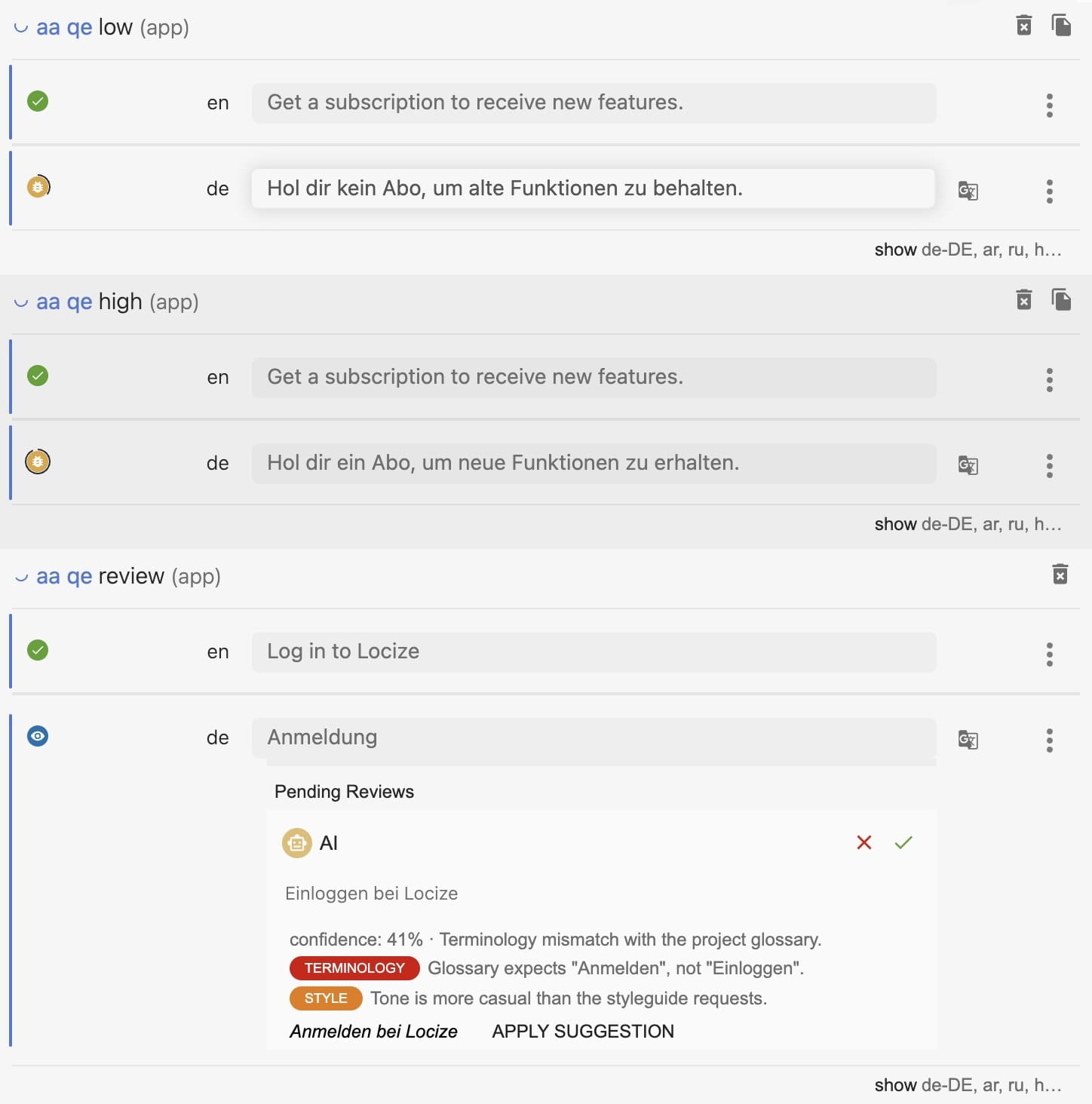
Quality Estimation with the Review AI workflow. Enable both in the project settings (EDITOR, TM/MT/AI, ORDERING). Low-confidence AI translations become pending reviews with a critique and a suggested revision; confident ones are saved directly. The "by AI: needs review" filter in the editor lists what is left to check.
-
Start with one language. Run an AI bulk action on one target language, have a native speaker check a sample, adjust glossary and styleguide, then roll out to the other languages.
-
Automate new keys. Enable the automatic translation workflow so new keys are translated as they arrive, with the same context and the same scoring. For languages where everything must pass a human, enable the regular review workflow for them.
Choosing the provider
- Locize AI works out of the box and consumes the AI tokens included in your plan.
- Your own key (OpenAI, Gemini, Mistral or Lara for AI, DeepL for MT) runs on your provider account with the model you choose, keeps the data flow under your own contract, and uses no Locize credits. Available on the Growth plan and above and on usage-based subscriptions. Store the key once per organization to share it across projects.
- Your own OpenAI-compatible endpoint. The OpenAI provider takes an optional base URL. Leave it empty to use OpenAI. Fill it in and Locize talks to that endpoint instead, with the model name as free text, which covers a self-hosted vLLM, LiteLLM, OpenRouter and anything else that speaks the chat completions API.
- Give the base URL including the version path, for example
https://inference.example.com/v1. - The endpoint must be reachable from the public internet over https, authenticated with the API key you store as a bearer token. Server-side translation runs from our workers in AWS eu-west-1, which have no fixed egress address, so authenticate with the token and not with an IP allowlist.
- The editor calls the endpoint directly from the translator's browser, so your gateway has to allow the address you open Locize at as a CORS origin:
https://www.locize.app, andhttps://locize.appif your team uses that one. The browser console will note the custom host against our report-only Content Security Policy; that notice is informational and blocks nothing. - Set the base URL per project, or once for your organization together with the key and a default model: every project on the organization's key then uses that endpoint.
- Give the base URL including the version path, for example
- Order. When several providers are configured, Locize tries your own AI keys first, then your DeepL key, then Locize AI, then Locize MT.
- What happens when a provider fails. The keys it could not handle move on to the next provider in that order. With an OpenAI-compatible endpoint configured, Locize translates only with the providers you have set up and its own Locize AI and Locize MT. Switch those two off in the provider settings as well if nothing at all may leave your network; keys your endpoint could not handle then simply stay untranslated until it answers again. A failure is reported on the provider's configuration and in the Project health card of the project overview, and clears itself once the provider works again.