
Organizations
Overview
The organization is your account layer in Locize, much like an organization on GitHub. It can stand for whatever unit you bill and staff together: a company, a department, a team, a product, or a purchase order.
It holds your team, your projects and your billing in one place:
- One roster: your team members are invited once, at the organization, and inherit into every project of the organization.
- One subscription: the first project that subscribes creates the subscription for the whole organization; every further project simply joins it, on every plan.
- One place for account-level things: billing details, invoices and cost metrics, SAML SSO, enforced 2-factor authentication, the audit log, and more over time.
An organization has exactly one subscription, one payment method and one invoice. There are no multiple subscriptions inside one organization: when you need a different payment method, different billing details or a different set of team members, that is a second organization.
Every user gets an organization automatically when creating their first own project (named after the company field, rename it any time). You don't have to set anything up.
Members and roles
Organization members carry one of the same roles you know from projects, but granted once, at the organization, inheriting into every organization project:
- Admin: runs the organization (members, billing, settings) and has admin access to every project.
- Accountant: sees billing only, no project content.
- Manager / Publisher / User: the same work roles as on projects, inherited everywhere. Roles can be scoped (for example: one language across all projects).
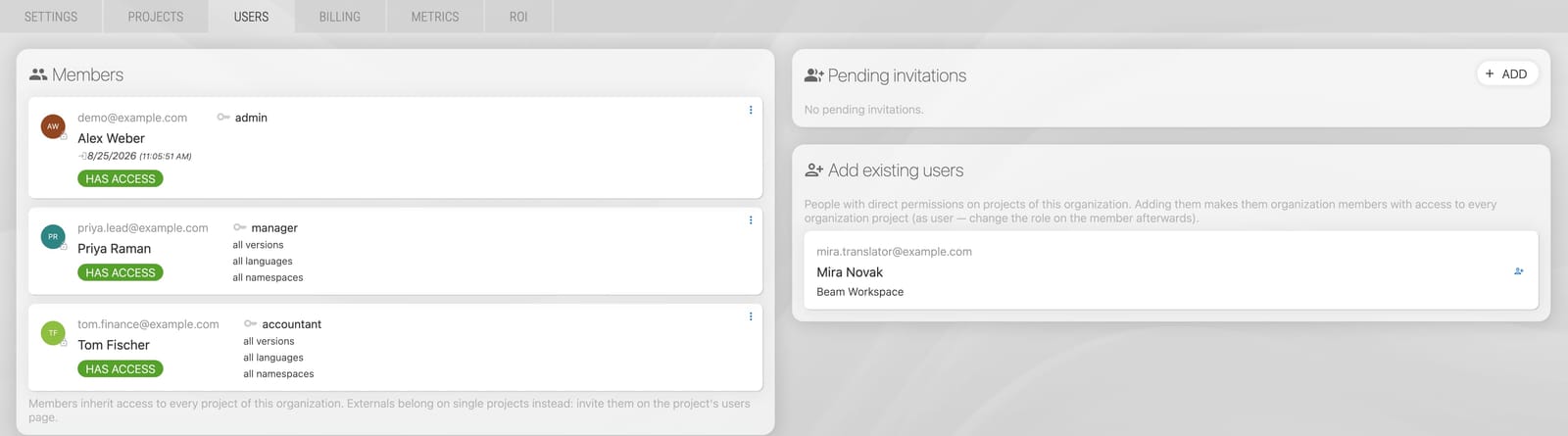
Two rules keep this simple:
- Admin and accountant exist only at the organization. Project permissions top out at manager, and organization admins and accountants reach every project of the organization — that is what running the organization means. To take that away, change or remove the person's role on the organization page.
- For the work roles (manager / publisher / user) a direct project permission wins over the inherited one. On a project's users page you can therefore override an organization member (give them a smaller role or a narrower scope on that single project) or block them there; "inherit" removes the override again and the organization permission applies. An organization admin can be overridden or blocked on a single project too, as long as at least one other organization admin keeps admin rights there (a project must never become unmanageable). Accountants cannot: theirs is a billing role, managed on the organization page only.
Externals stay on projects
The roster is for your own team. External translators or agency contacts get a direct project permission on exactly the project they work on (user/publisher/manager, scoped as needed) and they never see the rest of the organization. On a project's users page, every organization member shows a "via organization" badge — also when they hold an extra direct permission on that project. Only people who exist on the project alone (externals) show no badge.
Billing
The organization owns the Stripe customer and the subscription:
- The first project that subscribes creates the subscription, for the organization.
- Every further project that subscribes joins the organization's subscription: one invoice for everything, on every plan and whatever plan each project is on.
- Need a separate invoice for one project (another department or cost center)? Give that department its own organization: create the project in a new organization right from the add-project form ("+ create a new organization"), or move an existing project over with the handover below. Every subscription belongs to exactly one organization, so each department keeps its own members, its own settings and its own invoice.
- Cancelling the subscription keeps the organization and its projects; past invoices stay downloadable, and the next subscription reuses the same billing account.
- The organization's Billing tab is the billing home: the current billing period, payment method, billing address, the invoice history, the budget notification and the cancellation of the subscription live there. The Metrics tab charts the whole subscription's costs over time, per project. The Projects tab lists your projects and, for the one you select, what it costs this period, plus pausing it or taking it out of the organization's billing. Plans and add-ons stay per project, and you manage them right there: pick the project on the Projects tab and its plan, add-ons and top-ups sit next to its costs. (A project with no organization home for it, one billed separately, keeps its own "PLAN, ADDONS" tab.)
Projects keep their own plans and limits (words, downloads, tenants, …) exactly as before. The organization does not change what a plan includes, it changes where the bill lives.
A few things resolve across the organization instead of per project:
- Users: the roster size is checked against the most generous plan in the organization (Growth and above: unlimited).
- SAML SSO: configured for the organization, charged once per subscription, no matter how many projects use it. A plan that includes SSO covers the whole organization.
- Backup: a project's backup add-on covers its tenants too, at no extra charge.
- Enforce MFA: the organization can enforce 2-factor authentication for every organization project. Projects can additionally enforce it on their own, but cannot weaken the organization-wide setting. While it is enforced, members without MFA lose access to the projects and to organization actions until they enable MFA in their profile.
- Audit log: organization admins can download the organization's audit log (member and invitation changes) from the organization page, on plans that include the audit log.
- MT/AI credentials: your own DeepL, OpenAI, Gemini, Mistral or Lara key can be stored once for the organization, see the Settings tab below.
Settings: the organization itself and shared MT/AI credentials
The organization page's Settings tab holds two things:
- The organization: its name, and its deletion (see below).
- MT/AI credentials: enter your own provider keys once for the organization instead of in every project. On the project side nothing changes except one switch: in the project's provider configuration (Project settings → EDITOR, TM/MT/AI, ORDERING → the DeepL / OpenAI / Gemini / Mistral / Lara configuration) you choose use organization credentials or use own. With the switch on, the project's provider settings, prompts and models stay its own; only the key comes from the organization, is never copied into the project, and a key rotation happens in one place. A project that needs a different key keeps its own, exactly as before.
A few rules keep this simple and safe:
- Storing a key requires a project of the organization on a plan that includes bring-your-own-key MT/AI (Growth and above); using it requires the same on the project that switches, exactly like a project's own key.
- Keys are shown masked and cannot be revealed later; to change one, enter it again.
- A key that projects still use cannot be removed; switch those projects to their own credentials first (the organization page tells you which ones).
- Only the key is shared. The OpenAI provider's base URL for an OpenAI-compatible endpoint stays a per-project setting, like the model: set it on every project that uses the organization's key for that endpoint, otherwise the project talks to OpenAI with it.
- Every change is recorded in the organization's audit log (which provider, never the value).
Locize AI and Locize MT need no key and are not affected.
Tenants and branches
Tenant and branch projects follow their parent project's organization automatically. They stay invisible in the organization's project list (they are a feature of their parent, not standalone projects) and they carry no plan, billing page or add-ons of their own.
Deleting an organization
-
An organization can be deleted by an organization admin once it has no projects and no active subscription (delete or transfer the projects first, cancel the subscription first).
-
Handing a project to another organization works the same way whether the two organizations belong to one company or to two, so there is only one thing to learn:
- An admin of the organization that currently holds the project opens its Projects tab, picks the project and chooses "hand over" to generate a code for that one project.
- They send that code to an admin of the receiving organization (by mail, chat, however you like — the code is what carries the permission).
- That admin opens their own Projects tab, chooses "take over a project" and enters the code. They see which project arrives, which organization it comes from and the person behind it before confirming.
The project moves with its tenants and branches. A project billed with the old organization leaves that billing first. If the receiving organization has no subscription yet, the project keeps working for two more weeks so they can subscribe. And if the old organization enforces 2-factor authentication while the new one does not, the requirement is kept on the project itself, so a handover never silently weakens it — an admin of the new organization can lift it deliberately in the project's users settings.
-
Deleting your user account while you are the last admin of an organization that still has projects is blocked: transfer the organization first.
-
Empty organizations without any members are cleaned up automatically.
-
The Stripe records (past invoices) are never deleted.
For existing customers
If you managed multiple projects with collective billing before organizations existed, your billing group became an organization automatically:
- The billing project's admins became the organization's admins.
- Accountants stayed accountants, at the organization.
- Everyone else kept their project permissions; additional project-level admin permissions became manager permissions (billing moved to the organization, which only organization admins and accountants manage).
Your invoice stayed the same or got cheaper (SSO is now charged once per subscription instead of per project), and nobody lost access to a project they had.
One change reached every project with tenants or branches, not only the collectively billed ones: children used to inherit the people of their parent project, and that inheritance was retired. The access it granted at the time was written out as real permissions, so nobody lost a child project they could already open. Since then, reaching every tenant of a project comes from membership in the organization: a role handed out on the parent alone stops at the parent.