
Quality Estimation
Availability: Enabled by default for new projects, opt-in for existing ones. Requires enabled machine/AI translation.
Quality Estimation (QE) lets an AI evaluator score every AI-produced translation with a confidence estimate between 0 and 1, together with a short reason. The score is stored with the translation and surfaced in the editor, so you immediately see which AI translations are trustworthy and which ones deserve a human look.
- Only AI translations are scored at translation time (traditional machine translation is not). To check the translations a project already has, whoever wrote them, run AI Review.
- Scoring works for translations produced by the automatic translation workflow as well as AI bulk actions and the AI assistant in the editor.
- Scoring uses the same AI provider that produced the translation: with your own API key (OpenAI, Gemini, Mistral AI) the scoring runs on your key; with the built-in Locize AI it consumes AI tokens like any other Locize AI usage.
Enable Quality Estimation
New projects have Quality Estimation enabled by default (the built-in Locize AI works out of the box). For existing projects:
- Open your Project settings.
- Go to EDITOR, TM/MT/AI, ORDERING.
- In Cat settings, enable Quality Estimation (the toggle is available once machine translation is enabled).
What you see in the editor
- A per-segment confidence indicator on AI-translated segments.
- A confidence percentage (with the evaluator's reason as tooltip) next to the quality info of the selected segment.
- A "by AI: needs review" filter in the state filters, listing AI translations scoring below the needs-review threshold (0.7 by default). This is a confidence filter; the needs review state filter above it is the review queue (proposals and marked values), which low-confidence AI translations join as marked values.
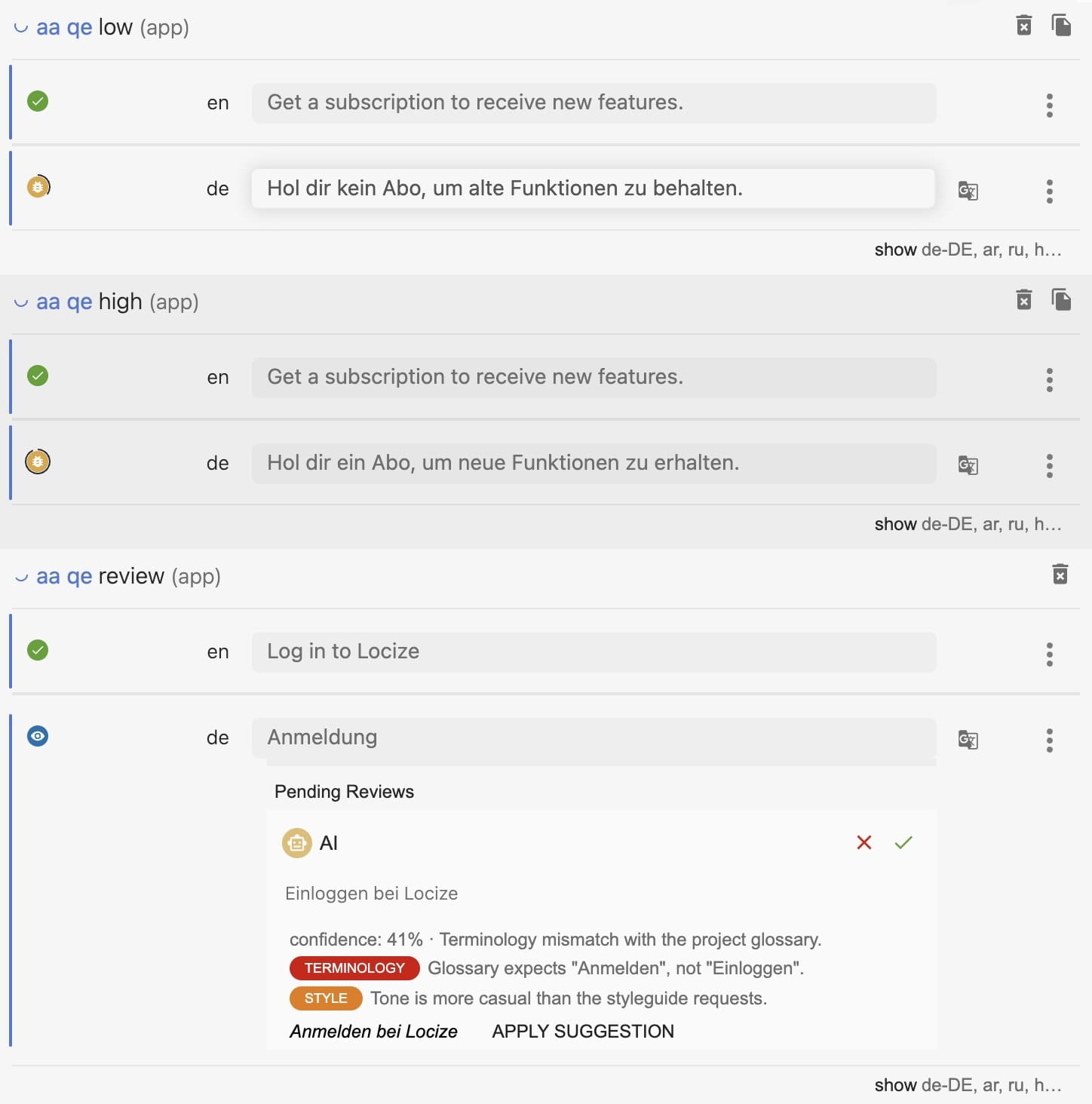
Low-confidence proposals routed via the Review AI workflow show the confidence, the critique, and a one-click suggested revision directly on the pending review.
When an AI translation is edited by a human, re-translated, or replaced from translation memory, its confidence score is removed automatically. A score always describes exactly the text it was computed for.
Review AI workflow (auto-route low confidence to humans)
With the additional Review AI workflow setting, low-confidence AI translations are not saved silently. Instead they arrive as pending review proposals:
- Low-confidence AI translations (score below the threshold, or with a major issue found) become pending reviews, even in languages that don't have review proposals enabled.
- High-confidence AI translations are saved directly.
- Routed proposals carry a critique: issue categories (accuracy, fluency, terminology, style) with severity and a short note. When the evaluator can clearly improve the translation, it also includes a suggested revision you can apply with one click.
- If a language has review proposals enabled, everything still becomes a proposal as usual; Quality Estimation then simply enriches those proposals with score and critique.
This differs from review proposals: those hold everything in the selected languages, while the Review AI workflow reviews selectively, based on confidence, across all languages.
How this relates to MQM
MQM (Multidimensional Quality Metrics) is the industry's standard framework for analytic translation quality evaluation: trained evaluators annotate individual errors against a typology of dimensions (accuracy, fluency, terminology, style, locale conventions, and others), assign each error a severity, and compute a quality score from the annotations. AutoMQM refers to using LLMs to produce MQM-style error annotations automatically.
Locize Quality Estimation is related but deliberately simpler: it is reference-free quality estimation, not an MQM implementation.
- The evaluator's critique categories (accuracy, fluency, terminology, style) correspond to the top-level MQM dimensions, and issues carry a severity, so the vocabulary translates directly if your organization runs a formal MQM program.
- QE does not produce span-level MQM error annotations, MQM scorecards, or certified MQM scores, and Locize does not claim MQM conformance.
- In practice the two compose: use QE's confidence scores to route doubtful AI translations to human review at scale, and reserve formal MQM evaluation (with human annotators or AutoMQM tooling) for the samples where you need an auditable analytic score.
Good to know
- The needs-review threshold defaults to 0.7. A different threshold between 0 and 1 can currently not be stored for a project. Contact us if you need a different threshold.
- Scoring roughly doubles the AI calls of a translation run. On very large namespaces the backend caps scoring per language and saves the remaining translations unscored.
- Quality Estimation complements the deterministic checks & issues, it does not replace them: broken placeholders or untranslated fragments are best caught by those checks.
- Scores are editor metadata: they are not included in your published translation files.
- A Styleguide and Glossary improve the evaluator's judgement the same way they improve translations.
- Review decisions preserve the confidence score at decision time in the segment history; the provenance export (project overview, context menu of a version, language or namespace) packages this evidence as CSV and JSON for audits.
- AI Review applies the same evaluator to existing translations of any origin and turns the doubted ones into review proposals with a suggested fix.
- Routing low-confidence AI translations into documented human review also supports the human-review exemption path of the EU AI Act's transparency rules: see Running an Article 50(4)-compatible review workflow (legal background in the explainer).