
Why is there such a high download amount?
What counts as 1 download?
1 download = 1 API or CDN request to fetch translations. A typical request fetches one namespace for one language, e.g.:
https://api.locize.app/{projectId}/{version}/{language}/{namespace}So if your app loads 3 namespaces in 5 languages, that’s 15 downloads per page load (without caching).
Downloads are counted from the CDN access logs: translations your app serves from a local cache without sending a request are not counted. Downloads from CI (e.g. locize download of the cli) count the same way, one per namespace and language, but only once per build.
If you notice a high number of downloads in your invoice or project statistics (see the Api Metrics tab on your project's metrics page), it’s usually due to how your app fetches translations.
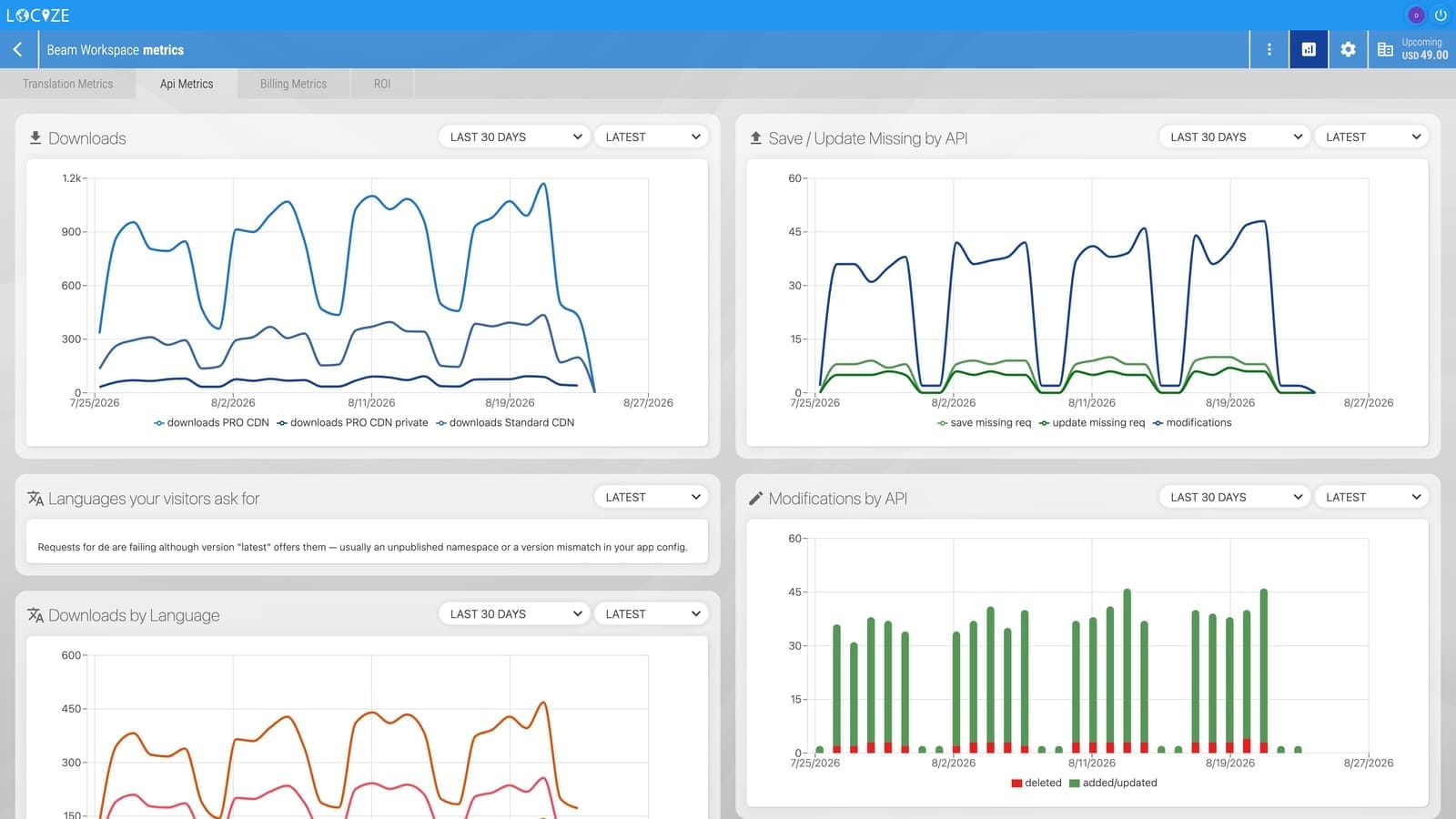
Here are the most common reasons and solutions:
You've integrated i18next-locize-backend or are using the download API in a serverless environment
Serverless functions are short-lived and don’t retain cache. Each invocation may trigger a new download of translations.
Solution: Download translations in your CI/CD pipeline (via cli or api) and package them with your serverless function.
You're creating a new i18next instance or initializing i18next on each request
Initializing i18next on every request will fetch translations each time, increasing downloads.
On a long-running Node server this gets worse over time.
i18next-locize-backenddefaultsreloadIntervalto 1 hour wheneverwindowis undefined, and that timer keeps each instance alive, so every instance you create keeps refetching its namespaces forever. Nothing errors, the process still exits normally, and your download count simply climbs between restarts. Note that server-side rendering counts here too: a component that initializes i18next runs on the server as well, once per render.
Solution: Redesign your initialization to use a single i18next instance, or clone the i18next instance if needed. On instances that are not that one long-lived singleton, set
reloadInterval: false.
How to spot it: in the Downloads by Browser chart on your metrics page, server-side requests appear as
i18next-locize-backend. If the hourly volume forms a floor that ratchets upwards and resets when you deploy, instead of following your traffic, it is this.
You're using next-i18next with the i18next-locize-backend
In some deployment environments (especially serverless), this can trigger downloads on every request.
On the App Router, watch the client side in particular:
I18nProvideris a Client Component, but Next.js also renders it on the server, once per request. Before next-i18next 16.0.11, a backend passed to it viausewas attached during that server pass too, so every render built a throwaway Node-side instance and left a refresh timer behind. If you pass a backend toI18nProvider, upgrade to 16.0.11 or later.
Solution: Bundle translations with your Next.js app using
resourceLoaderwith dynamic imports, or download them in CI/CD via locize-cli. If you use i18next-locize-backend at runtime, the server-side singleton in next-i18next v16 caches translations across requests, but in serverless environments, consider using it only on the client side. See the next-i18next v16 blog post and the Pages Router guide for details.
You're using remix-i18next with the i18next-locize-backend
Depending on your deployment, this may be due to serverless environments or frequent creation of new i18next instances.
Solution (React Router v7 framework mode, remix-i18next 7.x): Follow the React Router v7 walkthrough and the matching
locize-react-router-example— server-side bundles translations from local JSON; the client lazy-fetches fresh translations from the Locize CDN.
Solution (Remix v2, remix-i18next 6.x): Follow this guide and this example to bundle translations with your Remix app.
You've integrated the Locize CDN directly into your mobile app
Solution: Download translations when packaging your app (via cli or api) and bundle them with your mobile app. If you want a "live" fallback and use i18next with react-native, try react-native caching with AsyncStorage.
Other tips
Consider using caching for browser usage or other alternative caching approaches to further reduce downloads.