
Pluralization in i18n Formats
Pluralization is a fundamental aspect of internationalization (i18n). Every language has its own rules for expressing quantities, and handling plurals correctly is essential for natural, high-quality translations. Locize supports pluralization for all major i18n formats, making it easy to manage plurals in your localization workflow.
Why Pluralization Matters
- Plural forms are required for accurate, natural-sounding translations in many languages.
- Incorrect pluralization is a common source of localization bugs and user confusion.
- Locize automates plural key generation and ensures the correct forms are available for each language and format.
Pluralization: Separate Keys vs. In-Format Handling
Some i18n formats require you to define separate translation keys for each plural form (e.g., item_one, item_other). Others, like ICU MessageFormat or Fluent, solve pluralization directly within the value of a single key using special syntax, so you do not need to create multiple keys for each form.
Summary:
- Requires separate keys: i18next, i18n.js, Android, Gettext
- Handled within the format (single key): ICU MessageFormat, Fluent, vue-i18n, polyglot.js
See the table below for details.
Supported i18n Formats and Pluralization
Locize supports pluralization for a wide range of i18n formats. For details on each format, see the main i18n formats page and file formats.
| Format | Pluralization Support | Separate Keys Required? | Example/Docs |
|---|---|---|---|
| i18next / locizify | ✅ | Yes | i18next pluralization |
| ICU / messageformat | ✅ | No | ICU MessageFormat |
| fluent | ✅ | No | Fluent |
| vue-i18n | ✅ | No | vue-i18n pluralization |
| i18n.js / ruby | ✅ | Yes | i18n.js pluralization |
| polyglot.js | ✅ | No | polyglot.js pluralization |
| android | ✅ | Yes | Android plurals |
| Gettext | ✅ | Yes | Gettext plural forms |
How Pluralization Works in Locize
- Locize automatically generates the required plural keys for each language and format (if required/necessary).
- The CAT view / Translation Editor displays all necessary plural forms for each key.
- Plural rules are based on the Unicode CLDR plural rules.
- You can preview and edit all plural forms directly in the Locize UI.
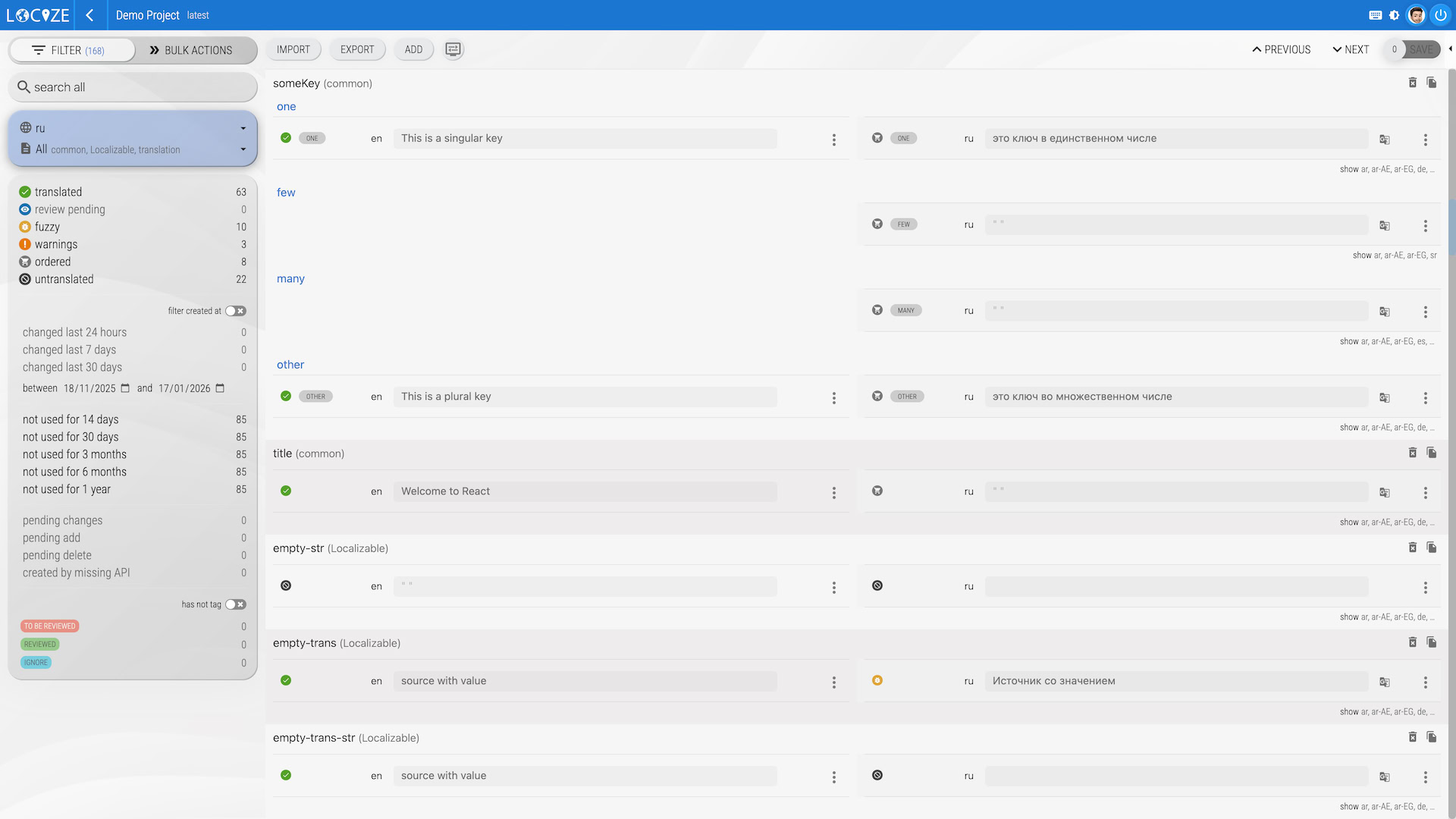
For more on why you might see keys like
_one,_few,_many,_other, see this FAQ.
Format-Specific Examples
i18next JSON (separate keys)
{
  "item_one": "One item",
  "item_other": "{{count}} items"
}
ICU MessageFormat (single key)
{
  "item": "{count, plural, one {One item} other {{count} items}}"
}
Gettext PO (separate keys)
msgid "item"
msgid_plural "items"
msgstr[0] "One item"
msgstr[1] "{count} items"
Android XML (separate keys)
<plurals name="item">
  <item quantity="one">One item</item>
  <item quantity="other">%d items</item>
</plurals>
Fluent (single key)
item =
  { $count ->
    [one] One item
   *[other] { $count } items
  }
Best Practices for Pluralization
- Always use the pluralization features of your chosen i18n format.
- Avoid hardcoding plural forms in your code or translations.
- Test your app in languages with complex plural rules (e.g., Russian, Arabic).
- For more tips, see the i18next pluralization guide and Unicode CLDR plural rules.