
File Formats
Locize supports a variety of translation file formats for import and export, making it easy to integrate with your existing localization workflow. If you need a format that isn’t listed here, send us an email; we’re always working to extend our supported formats!
Locize generally only handles translation content (keys and values) and does not preserve the original file structure. If you want to import a file and later export it with the original structure, this is not supported for every format. These file formats are used as translation containers for imports and exports. The originally used i18n format will always be respected; there is no conversion during import/export.
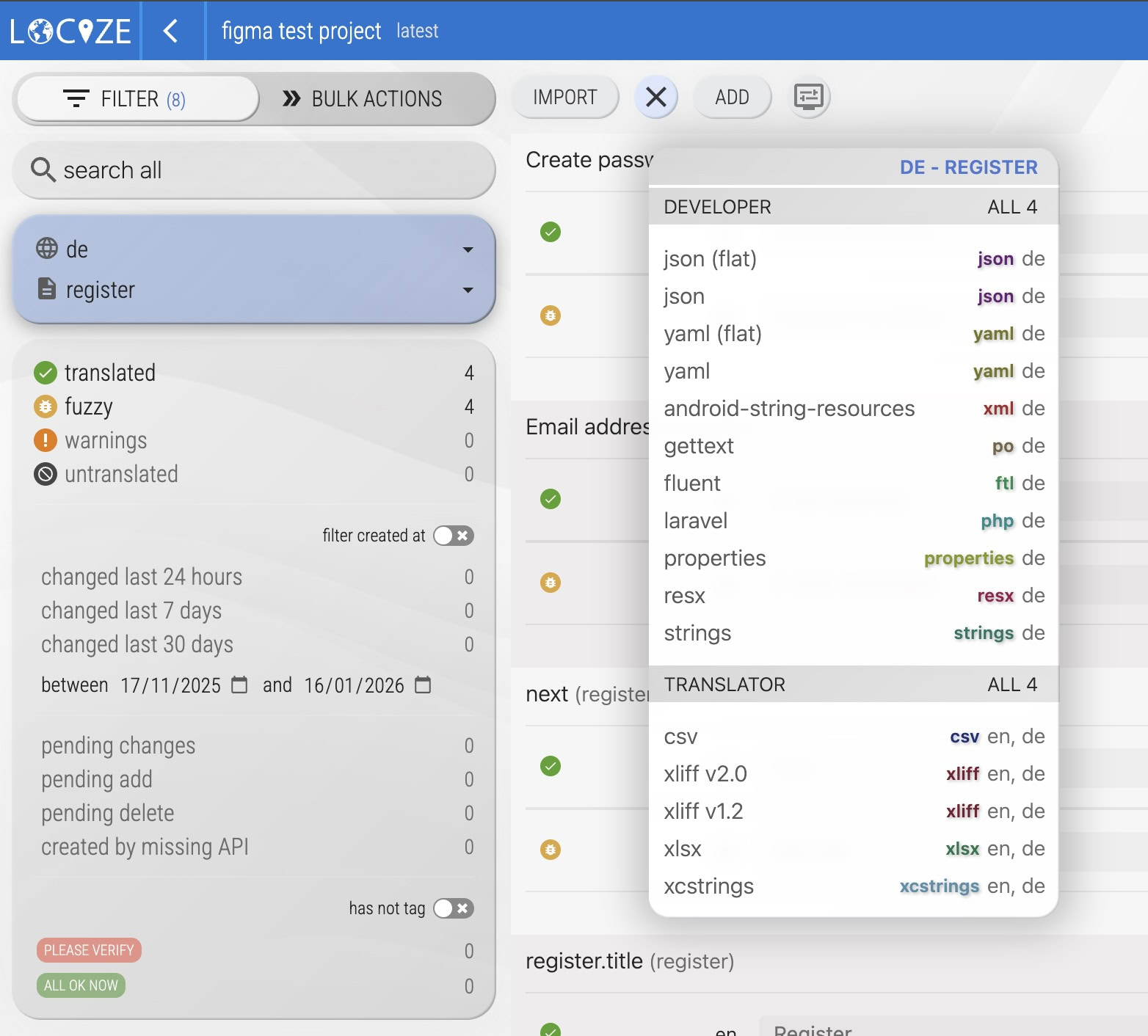
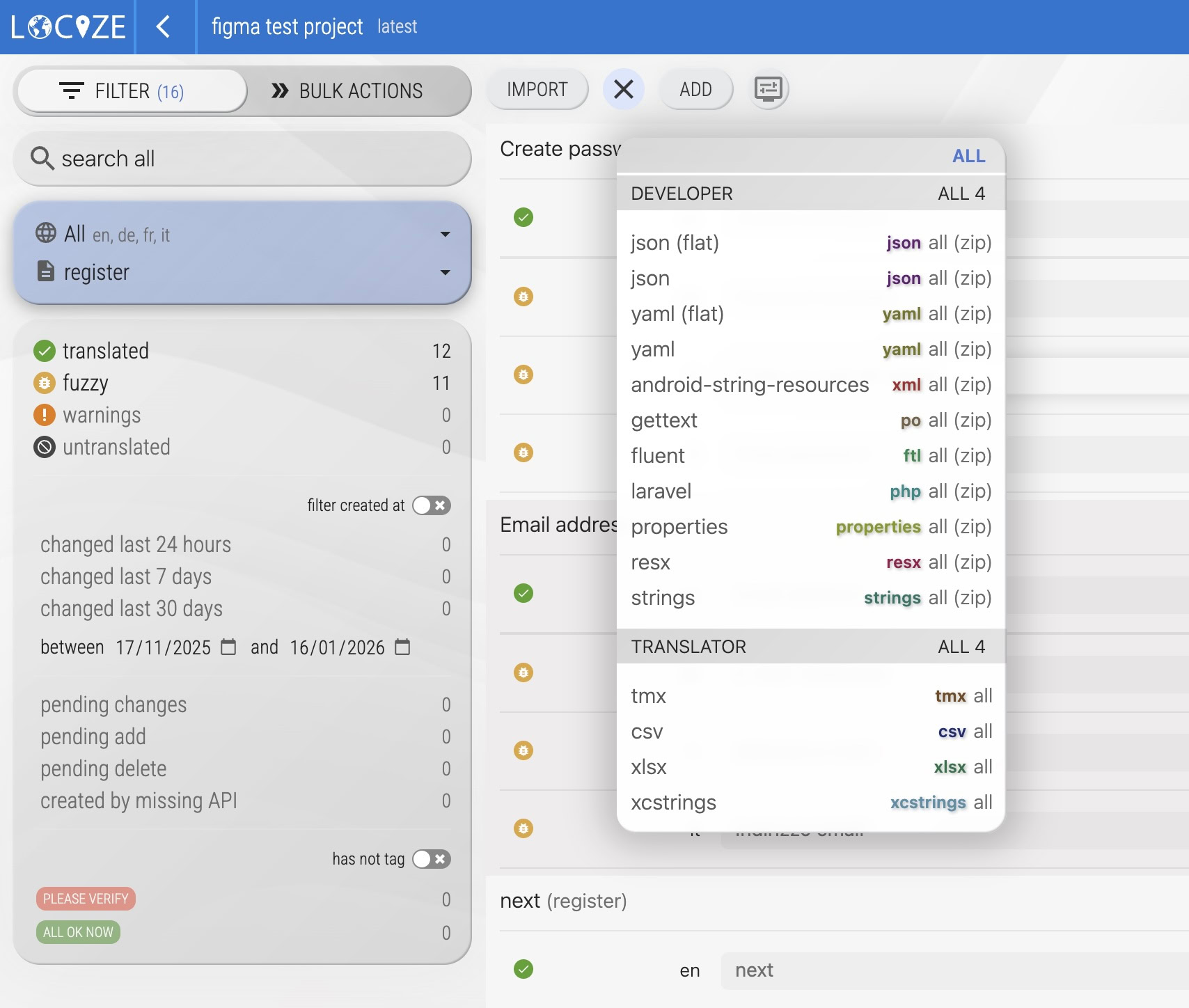
Export Options in the UI
- Language/namespace specific format: Select the appropriate language and namespace in the filter to export a file for a dedicated language.
- "All" format or zip: Deselect language and namespace in the filter to export a "all" format or zip file for the whole project.
Format Details & Examples
JSON nested
Will import/export in JSON format, nesting keys separated by .:
{
  "appName": "locize.com - localization as a service",
  "label": {
    "cancel": "cancel",
    "save": "save"
  }
}
JSON flatten
Will import/export in JSON format, flat (ignoring . separation):
{
  "appName": "locize.com - localization as a service",
  "label.cancel": "cancel",
  "label.save": "save"
}
CSV and XLSX
Exports reference and target language in one file. Supported for imports and useful for sending translations to freelancers. For optimal import, reuse previously exported files including added translations.
"key","de","en"
"appName","locize.com - Lokalisierung als Service","locize.com - localization as a service"
"label.cancel","abbrechen","cancel"
"label.save","speichern","save"
On import, ensure the first line contains the same language codes as in your Locize project. You might see a “###ignore###” text in your exported "all" format file. This marks keys missing in the reference language or plural forms not present for a specific language.
The "all" format (exported with no language or namespace selected in the filter) also contains the columns namespace, tags, context and maxCharacters (the character limit checked by issue 310). On import, tags, context and character limits are applied to the reference language, so the file can also be used to set them in bulk. Empty cells are skipped.
"key","tags","context","maxCharacters","namespace","en","de"
"label.save","","Button in the toolbar","12","common","save","speichern"
YAML
Alternative format to JSON.
appName: locize.com - localization as a service
label.cancel: cancel
label.save: save
XLIFF 1.2
Standard translation exchange format.
<xliff xmlns:xsi="http://www.w3.org/2001/XMLSchema-instance" xsi:schemaLocation="urn:oasis:names:tc:xliff:document:1.2 http://docs.oasis-open.org/xliff/v1.2/os/xliff-core-1.2-strict.xsd" xmlns="urn:oasis:names:tc:xliff:document:1.2" version="1.2">
  <file original="formats" datatype="plaintext" source-language="de" target-language="en">
    <body>
      <trans-unit id="appName">
        <source>locize.com - Lokalisierung als Service</source>
        <target>locize.com - localization as a service</target>
      </trans-unit>
      <trans-unit id="label.cancel">
        <source>abbrechen</source>
        <target>cancel</target>
      </trans-unit>
      <trans-unit id="label.save">
        <source>speichern</source>
        <target>save</target>
      </trans-unit>
    </body>
  </file>
</xliff>
On import, ensure you have only one
<file>tag in the XLIFF file, and theoriginalattribute matches your namespace name.
XLIFF 2.0
Well known translation exchange format. Used format on iOS.
<xliff xmlns="urn:oasis:names:tc:xliff:document:2.0" version="2.0" srcLang="de" trgLang="en">
  <file id="formats">
    <unit id="appName">
      <segment>
        <source>locize.com - Lokalisierung als Service</source>
        <target>locize.com - localization as a service</target>
      </segment>
    </unit>
    <unit id="label.cancel">
      <segment>
        <source>abbrechen</source>
        <target>cancel</target>
      </segment>
    </unit>
    <unit id="label.save">
      <segment>
        <source>speichern</source>
        <target>save</target>
      </segment>
    </unit>
  </file>
</xliff>
On import, ensure you have only one
<file>tag in the XLIFF file, and theoriginalattribute matches your namespace name.
Android resource string
Format used on Android.
<resources>
  <string name="appName">locize.com - localization as a service</string>
  <string name="label.cancel">cancel</string>
  <string name="label.save">save</string>
</resources>
Strings resources
Format used for example for OS X and iOS.
"appName" = "locize.com - localization as a service";
"label.cancel" = "cancel";
"label.save" = "save";
Gettext po files
Gettext standard format.
msgid ""
msgstr ""
"Project-Id-Version: Locize: My project - translations\n"
"MIME-Version: 1.0\n"
"Content-Type: text/plain; charset=utf-8\n"
"Content-Transfer-Encoding: 8bit\n"
"Plural-Forms: nplurals=2; plural=(n != 1)\n"
"POT-Creation-Date: 2017-07-14T22:26:46.631Z\n"
"PO-Revision-Date: 2017-07-14T22:26:46.631Z\n"
"Language: it\n"
msgid "title"
msgstr "La soluzione migliore per il miglior cliente!"
msgid "description"
msgstr ""
"Questa è una descrizione di esempio per mostrare come funziona la traduzione "
"in un file .po."
TMX
Used mostly as translation memory file.
<tmx version="1.4b">
  <header creationtool="tmexchange" creationtoolversion="1.0.1" adminlang="en" datatype="PlainText" segtype="sentence" o-tmf="ABCTransMem" srclang="en"/>
  <body>
    <tu tuid="appName">
      <prop type="group">my-namespace</prop>
      <tuv xml:lang="en">
        <seg>locize.com - localization as a service</seg>
      </tuv>
      <tuv xml:lang="de">
        <seg>locize.com - Lokalisierung als Dienstleistung</seg>
      </tuv>
    </tu>
    <tu tuid="label.cancel">
      <prop type="group">my-namespace</prop>
      <tuv xml:lang="en">
        <seg>cancel</seg>
      </tuv>
      <tuv xml:lang="de">
        <seg>Abbrechen</seg>
      </tuv>
    </tu>
    <tu tuid="label.save">
      <prop type="group">my-namespace</prop>
      <tuv xml:lang="en">
        <seg>save</seg>
      </tuv>
      <tuv xml:lang="de">
        <seg>Speichern</seg>
      </tuv>
    </tu>
  </body>
</tmx>
resx Files (.net)
Localization files used in .net framework
<?xml version="1.0" encoding="utf-8"?>
<root>
  <!--
    Microsoft ResX Schema
    Version 2.0
    The primary goals of this format is to allow a simple XML format
    that is mostly human readable. The generation and parsing of the
    various data types are done through the TypeConverter classes
    associated with the data types.
    Example:
    ... ado.net/XML headers & schema ...
    <resheader name="resmimetype">text/microsoft-resx</resheader>
    <resheader name="version">2.0</resheader>
    <resheader name="reader">System.Resources.ResXResourceReader, System.Windows.Forms, ...</resheader>
    <resheader name="writer">System.Resources.ResXResourceWriter, System.Windows.Forms, ...</resheader>
    <data name="Name1"><value>this is my long string</value><comment>this is a comment</comment></data>
    <data name="Color1" type="System.Drawing.Color, System.Drawing">Blue</data>
    <data name="Bitmap1" mimetype="application/x-microsoft.net.object.binary.base64">
        <value>[base64 mime encoded serialized .NET Framework object]</value>
    </data>
    <data name="Icon1" type="System.Drawing.Icon, System.Drawing" mimetype="application/x-microsoft.net.object.bytearray.base64">
        <value>[base64 mime encoded string representing a byte array form of the .NET Framework object]</value>
        <comment>This is a comment</comment>
    </data>
    There are any number of "resheader" rows that contain simple
    name/value pairs.
    Each data row contains a name, and value. The row also contains a
    type or mimetype. Type corresponds to a .NET class that support
    text/value conversion through the TypeConverter architecture.
    Classes that don't support this are serialized and stored with the
    mimetype set.
    The mimetype is used for serialized objects, and tells the
    ResXResourceReader how to depersist the object. This is currently not
    extensible. For a given mimetype the value must be set accordingly:
    Note - application/x-microsoft.net.object.binary.base64 is the format
    that the ResXResourceWriter will generate, however the reader can
    read any of the formats listed below.
    mimetype: application/x-microsoft.net.object.binary.base64
    value   : The object must be serialized with
            : System.Runtime.Serialization.Formatters.Binary.BinaryFormatter
            : and then encoded with base64 encoding.
    mimetype: application/x-microsoft.net.object.soap.base64
    value   : The object must be serialized with
            : System.Runtime.Serialization.Formatters.Soap.SoapFormatter
            : and then encoded with base64 encoding.
    mimetype: application/x-microsoft.net.object.bytearray.base64
    value   : The object must be serialized into a byte array
            : using a System.ComponentModel.TypeConverter
            : and then encoded with base64 encoding.
    -->
  <xsd:schema id="root" xmlns="" xmlns:xsd="http://www.w3.org/2001/XMLSchema" xmlns:msdata="urn:schemas-microsoft-com:xml-msdata">
    <xsd:import namespace="http://www.w3.org/XML/1998/namespace"/>
    <xsd:element name="root" msdata:IsDataSet="true">
      <xsd:complexType>
        <xsd:choice maxOccurs="unbounded">
          <xsd:element name="metadata">
            <xsd:complexType>
              <xsd:sequence>
                <xsd:element name="value" type="xsd:string" minOccurs="0"/>
              </xsd:sequence>
              <xsd:attribute name="name" use="required" type="xsd:string"/>
              <xsd:attribute name="type" type="xsd:string"/>
              <xsd:attribute name="mimetype" type="xsd:string"/>
              <xsd:attribute ref="xml:space"/>
            </xsd:complexType>
          </xsd:element>
          <xsd:element name="assembly">
            <xsd:complexType>
              <xsd:attribute name="alias" type="xsd:string"/>
              <xsd:attribute name="name" type="xsd:string"/>
            </xsd:complexType>
          </xsd:element>
          <xsd:element name="data">
            <xsd:complexType>
              <xsd:sequence>
                <xsd:element name="value" type="xsd:string" minOccurs="0" msdata:Ordinal="1"/>
                <xsd:element name="comment" type="xsd:string" minOccurs="0" msdata:Ordinal="2"/>
              </xsd:sequence>
              <xsd:attribute name="name" type="xsd:string" use="required" msdata:Ordinal="1"/>
              <xsd:attribute name="type" type="xsd:string" msdata:Ordinal="3"/>
              <xsd:attribute name="mimetype" type="xsd:string" msdata:Ordinal="4"/>
              <xsd:attribute ref="xml:space"/>
            </xsd:complexType>
          </xsd:element>
          <xsd:element name="resheader">
            <xsd:complexType>
              <xsd:sequence>
                <xsd:element name="value" type="xsd:string" minOccurs="0" msdata:Ordinal="1"/>
              </xsd:sequence>
              <xsd:attribute name="name" type="xsd:string" use="required"/>
            </xsd:complexType>
          </xsd:element>
        </xsd:choice>
      </xsd:complexType>
    </xsd:element>
  </xsd:schema>
  <resheader name="resmimetype">
    <value>text/microsoft-resx</value>
  </resheader>
  <resheader name="version">
    <value>2.0</value>
  </resheader>
  <resheader name="reader">
    <value>System.Resources.ResXResourceReader, System.Windows.Forms, Version=4.0.0.0, Culture=neutral, PublicKeyToken=b77a5c561934e089</value>
  </resheader>
  <resheader name="writer">
    <value>System.Resources.ResXResourceWriter, System.Windows.Forms, Version=4.0.0.0, Culture=neutral, PublicKeyToken=b77a5c561934e089</value>
  </resheader>
  <data name="action.add" xml:space="preserve">
    <value>Add</value>
  </data>
  <data name="action.addDemoProject" xml:space="preserve">
    <value>Create a demo project</value>
  </data>
  <data name="action.addNewLanguage" xml:space="preserve">
    <value>Add new language</value>
  </data>
</root>
Fluent
Mozilla's translation format
emails =
  { $unreadEmails ->
    [one] You have one unread email.
   *[other] You have { $unreadEmails } unread emails.
  }
-brand-name =
  {
   *[nominative] Firefox
    [accusative] Firefoxa
  }
-another-term = another term
app-title = { -brand-name }
restart-app = Zrestartuj { -brand-name[accusative] }.
# Note: { $title } is a placeholder for the title of the web page
# captured in the screenshot. The default, for pages without titles, is
# creating-page-title-default.
login = Predefined value
  .placeholder = example@email.com
  .aria-label = Login input value
  .title = Type your login email
logout = Logout
Laravel
PHP Laravel's translation format
<?php
  return [
    'key1' => 'Hello! Let\'s go!',
    'key2' => 'An application to manipulate and process laravel php language files',
    'key' => [
      'nested' => 'laravel Data Manager'
    ]
  ];
.properties
(Java) .properties files
key1 = Hello! Let\'s go!
key2 = An application to manipulate and process .properties language files
key.nested = .properties Data Manager
.xcstrings
Apple string catalog files
{
  "sourceLanguage" : "en",
  "strings" : {
    "empty" : {
    },
    "empty-str" : {
      "localizations" : {
        "en" : {
          "stringUnit" : {
            "state" : "translated",
            "value" : ""
          }
        }
      }
    },
    "empty-trans" : {
      "localizations" : {
        "en" : {
          "stringUnit" : {
            "state" : "translated",
            "value" : "source with value"
          }
        }
      }
    },
    "empty-trans-str" : {
      "localizations" : {
        "de" : {
          "stringUnit" : {
            "state" : "translated",
            "value" : ""
          }
        },
        "en" : {
          "stringUnit" : {
            "state" : "translated",
            "value" : "source with value"
          }
        }
      }
    },
    "key1" : {
      "comment" : "some comment",
      "localizations" : {
        "de" : {
          "stringUnit" : {
            "state" : "translated",
            "value" : "Hallo"
          }
        },
        "en" : {
          "stringUnit" : {
            "state" : "translated",
            "value" : "Hello"
          }
        }
      }
    },
    "key2.nested" : {
      "comment" : "comment",
      "localizations" : {
        "de" : {
          "stringUnit" : {
            "state" : "translated",
            "value" : "xcstrings Daten-Manager"
          }
        },
        "en" : {
          "stringUnit" : {
            "state" : "translated",
            "value" : "xcstrings Data Manager"
          }
        }
      }
    },
    "interpolation" : {
      "comment" : "some substitution",
      "localizations" : {
        "de" : {
          "stringUnit" : {
            "state" : "translated",
            "value" : "%d von %d verbleiben"
          }
        },
        "en" : {
          "stringUnit" : {
            "state" : "translated",
            "value" : "%d of %d remaining"
          }
        }
      }
    },
    "pluralized" : {
      "comment" : "Pluralized translation",
      "localizations" : {
        "de" : {
          "variations" : {
            "plural" : {
              "one" : {
                "stringUnit" : {
                  "state" : "translated",
                  "value" : "%lld Haus"
                }
              },
              "other" : {
                "stringUnit" : {
                  "state" : "translated",
                  "value" : "%lld Häuser"
                }
              }
            }
          }
        },
        "en" : {
          "variations" : {
            "plural" : {
              "one" : {
                "stringUnit" : {
                  "state" : "translated",
                  "value" : "%lld house"
                }
              },
              "other" : {
                "stringUnit" : {
                  "state" : "translated",
                  "value" : "%lld houses"
                }
              }
            }
          }
        }
      }
    },
    "vars" : {
      "localizations" : {
        "de" : {
          "variations" : {
            "device" : {
              "iphone" : {
                "stringUnit" : {
                  "state" : "translated",
                  "value" : "eine Übersetzung für das iPhone"
                }
              },
              "other" : {
                "stringUnit" : {
                  "state" : "translated",
                  "value" : "eine andere Übersetzung"
                }
              }
            }
          }
        },
        "en" : {
          "variations" : {
            "device" : {
              "iphone" : {
                "stringUnit" : {
                  "state" : "translated",
                  "value" : "a translation for the iPhone"
                }
              },
              "other" : {
                "stringUnit" : {
                  "state" : "translated",
                  "value" : "an other translation"
                }
              }
            }
          }
        }
      }
    },
    "vars-pluralized-dev" : {
      "comment" : "ctx1",
      "localizations" : {
        "de" : {
          "variations" : {
            "device" : {
              "appletv" : {
                "variations" : {
                  "plural" : {
                    "one" : {
                      "stringUnit" : {
                        "state" : "translated",
                        "value" : "ein Apple TV"
                      }
                    },
                    "other" : {
                      "stringUnit" : {
                        "state" : "translated",
                        "value" : "%lld Apple TVs"
                      }
                    }
                  }
                }
              },
              "iphone" : {
                "variations" : {
                  "plural" : {
                    "one" : {
                      "stringUnit" : {
                        "state" : "translated",
                        "value" : "ein Iphone"
                      }
                    },
                    "other" : {
                      "stringUnit" : {
                        "state" : "translated",
                        "value" : "%lld Iphones"
                      }
                    }
                  }
                }
              },
              "other" : {
                "stringUnit" : {
                  "state" : "translated",
                  "value" : "%lld Geräte"
                }
              }
            }
          }
        },
        "en" : {
          "variations" : {
            "device" : {
              "appletv" : {
                "variations" : {
                  "plural" : {
                    "one" : {
                      "stringUnit" : {
                        "state" : "translated",
                        "value" : "one apple tv"
                      }
                    },
                    "other" : {
                      "stringUnit" : {
                        "state" : "translated",
                        "value" : "%lld apple tvs"
                      }
                    }
                  }
                }
              },
              "iphone" : {
                "variations" : {
                  "plural" : {
                    "one" : {
                      "stringUnit" : {
                        "state" : "translated",
                        "value" : "an iphone"
                      }
                    },
                    "other" : {
                      "stringUnit" : {
                        "state" : "translated",
                        "value" : "%lld iphones"
                      }
                    }
                  }
                }
              },
              "other" : {
                "stringUnit" : {
                  "state" : "translated",
                  "value" : "%lld devices"
                }
              }
            }
          }
        }
      }
    }
  },
  "version" : "1.0"
}
On import try to select 1 namespace and "all" languages.Substitutions are currently not supported.Interpolation and pluralization formatting is not modified/converted automatically.