On this page
Translation file management is the practice of keeping the files an application loads its translations from (JSON, YAML, .resx, .po, .strings and similar formats) complete, valid and in sync with the code that uses them, without developers or translators editing those files by hand. In most setups the files still exist. What changes is their role: they become an output of the translation workflow instead of its user interface.
This post is about how teams end up hand-editing translation files, what breaks when they do, what the alternatives actually look like, and what switching does not fix.
- A translation file is a build input, not a document: one trailing comma or unescaped quote makes it invalid, and an invalid file typically fails silently at runtime.
- Manual editing scales badly on two axes at once: the number of languages and the number of people who need to change text. One developer with two languages is fine; a translator in a pull request is not.
- What breaks: merge conflicts on locale files, drift between files and code (missing and orphaned keys), keys nobody owns, a deploy for every typo, and terminology that varies between files with no view across them.
- What removes the editing: keys that originate in code (extraction or runtime reporting), an editor for the people who write text, and files that are generated by a sync step or replaced by CDN delivery. Coding agents can contribute drafts; they do not replace that layer.
Why teams end up hand-editing translation files
Nobody chooses this as a strategy. It starts as the obviously correct decision: i18next, react-intl, vue-i18n and their peers load a JSON file per language, so the first developer creates en/common.json, adds de/common.json, and edits both in the code editor. Nested or flat keys, {{count}} placeholders, _one and _other plural suffixes: with one person and two languages, editing the file is the translation tool, and a good one.
Then the users of that tool change while the tool stays. A third language arrives with a colleague who speaks it. A product manager wants to fix a label before the demo. An agency translator delivers Polish. Each of them is handed the same thing the first developer had: a file with strict syntax, no context, and a git workflow around it. The setup did not get worse. The people using it stopped being developers.
The format itself adds traps that are invisible until they fire. JSON allows no trailing commas, no single quotes and no unescaped quotation marks inside strings. Plural forms are encoded as key suffixes that differ between the i18next JSON v3 and v4 conventions (the JSON format reference covers both). A placeholder renamed in one language renders literally on screen. And because the file is loaded at runtime, a syntax error does not fail the build; it fails the page, for the users of that language, after the deploy.
What breaks
Merge conflicts on the most boring file in the repository
Two feature branches each add keys to common.json. JSON has no merge semantics: the conflict lands on the closing brace, someone resolves it by hand, and one branch's keys quietly disappear. Locale files are the file type with the highest conflict rate in many front-end repositories, precisely because every feature touches them and nobody feels ownership of them.
Drift between files and code
Code references keys that no file contains, so the UI shows the key name or the English fallback. Files contain keys no code references anymore, so translators keep translating dead strings. The English file was updated, the German one was not, and nothing marks the German value as stale. Over a year the language files diverge structurally, and the only way to find out is to diff them by hand.
Translators in git
The moment a translator edits a file, the workflow demands a pull request. The reviewer cannot judge the Polish, so they review the diff for syntax. The translator cannot see where the string appears, what {{name}} will contain or whether the button is wide enough. In practice the fix travels as a chat message that a developer pastes into the file, which is manual editing with an extra hop.
Keys nobody owns
Key naming is decided per pull request. btn.save, actions.save and common.save coexist and nobody knows whether they are meant to differ. Renaming a key means touching every language file. Deleting one means hoping no screen still uses it. The file has no notion of who created a key, when, or why.
A deploy for every typo
In a file-based setup a translation change is a code change: commit, build, deploy. A wrong label in Italian rides the next release train unless someone hotfixes production for a string. Teams learn to batch translation fixes, which is a polite name for leaving them broken for a while.
Consistency across files is invisible
The same source term is translated three different ways across namespaces, and no file-level tool can show you, because the disagreement lives across files, not inside one. This is the most widespread defect class in real translation data, and the one manual review is worst at catching; the numbers are in what actually breaks in translations.
How teams manage translation files today
Most teams sit in one of five setups, and the honest picture is that each of them is right for someone.
- A code editor and conventions. VS Code with JSON validation and an extension such as i18n Ally that shows translation status per language. Works for a solo developer or a small team where everyone who edits text can read the format. Stops working the day a non-developer needs to change a string. If this is where you are, the FAQ on opening and editing JSON files is the pragmatic guide.
- Spreadsheet round trips. Export the file to a sheet, send it to translators, import the result with a script. Familiar for translators, and a snapshot problem for everyone else: the sheet and the file diverge while the translation is out, and the merge back is manual again.
- Scripts and CI sync. A tool extracts keys from the source (for i18next,
i18next-cli extract), a script or a GitHub Action pushes them to a service and pulls the translated files back, optionally with machine or AI translation in between. This keeps the files generated and the developers away from them. It still needs an editor on the other side for the humans who review and correct, and it does not answer the ownership and consistency questions by itself. - A translation management system. Keys arrive from code, translators work in an editor with context and terminology, files are exported or synced in the formats the build expects, or delivered over a CDN so the build stops needing them. This is the setup the other four grow into once more than one person writes text.
- Coding agents editing the files. The newest option: an agent adds the key to all twelve language files, drafts the translations and opens the pull request. It is genuinely good at the mechanical part. It also reintroduces the original problem at higher speed: text nobody reviewed, terminology that varies between runs, and no record beyond a commit by a bot. What fails in AI-only pipelines, and the graduation path out of them, is covered in when AI translations break.
What actually removes the manual editing
Tool choice aside, four properties separate a workflow where nobody edits translation files from one where somebody still does.
- Keys originate in code, not in files. Either a static extraction step reads the translation calls, or the running application reports a key the first time it is used. Both mean a developer never opens a locale file to add an entry.
- The people who write text get an editor. Source text, placeholders, screenshots, the glossary, the history of the key, all languages side by side. A translator who can see the button does not need to guess its width.
- Files are generated or gone. Either a sync or download step writes the files in the format the build expects, preserving structure and plural forms on the round trip, or the application loads translations at runtime and the repository contains no locale files at all. Diff-based sync matters here: a pull request should translate only the keys it added, not re-push the whole project.
- Every change has an owner and a record. Who added the key, who translated it, who approved it, when it was published. A file has none of that; a pull request has a fraction of it.
What this does not solve
Removing file editing removes a chore. It does not remove the actual hard parts of localization, and a workflow change should not be sold as if it did.
- Key strategy is still yours. Natural-language keys versus stable identifiers, namespaces per feature or per page: a tool moves the keys, it does not design them. The trade-offs are in the guide to i18n key naming.
- Ambiguity still needs a human to notice. "Open" as a verb and "Open" as a status may need two translations; no sync step spots that. Context features and screenshots help the translator once someone has flagged the case.
- Quality is a separate layer. Terminology that must not drift, formality that must not flip mid-app, and the question of who approved a translation are handled by a glossary, a review workflow and automated QA checks, not by where the files live.
- Sometimes the file is the right tool. One developer, two languages they can read, no revenue depending on the copy: a code editor is the cheapest correct setup. The upgrade signal is the second person who needs to change text.
How this works in Locize
Locize is built around the four properties above, for the i18next ecosystem first and for other formats through the CLI.
- Keys from code. With i18next-locize-backend and
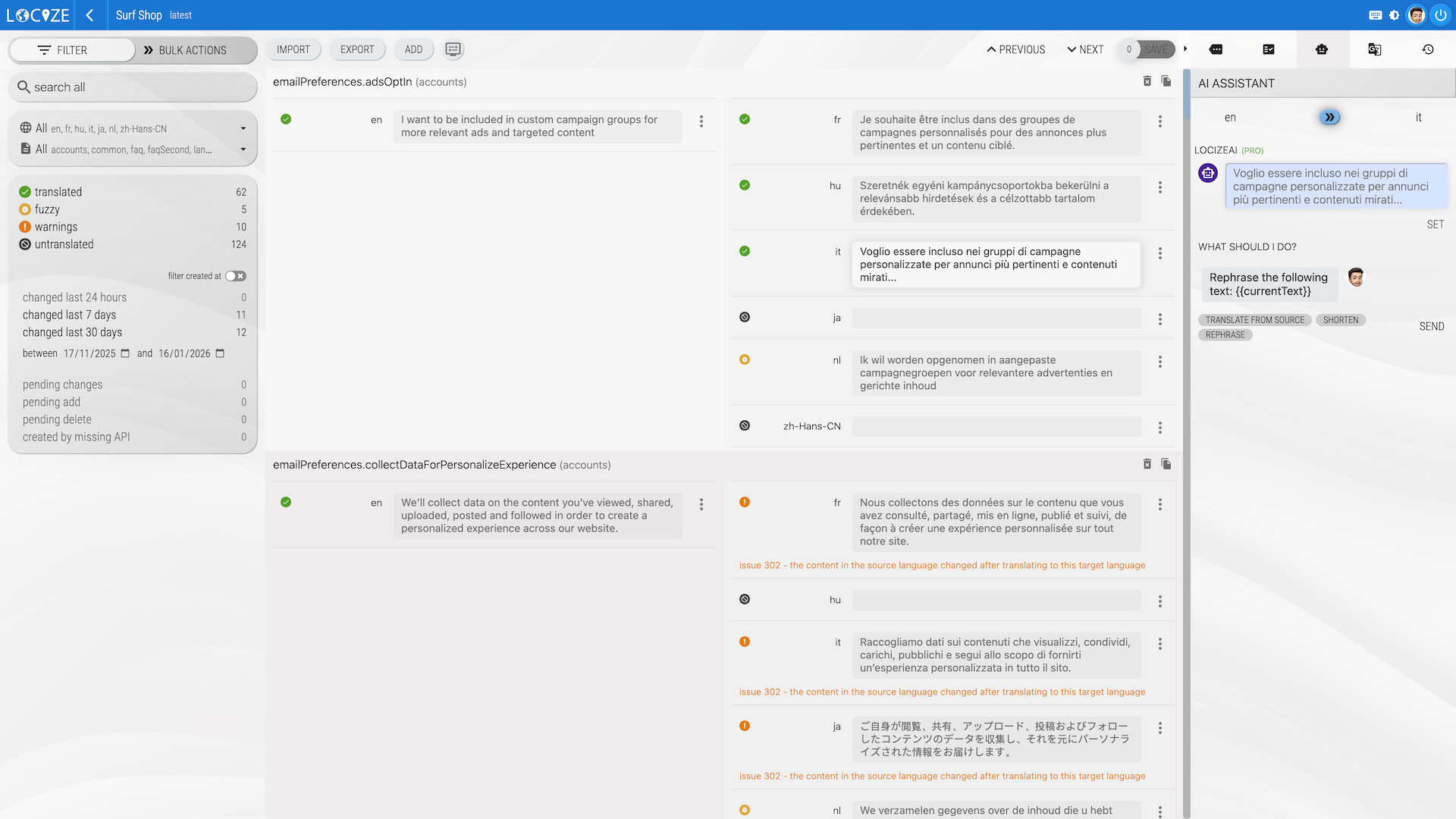
saveMissing: true(gated to development, so production stays read-only), every key the application renders for the first time is created in the project with its default value; locizify does the same for static sites with one script tag. Prefer a static pipeline?i18next-cli extractfollowed bylocize-sync, orlocize syncfor JSON, YAML, XLIFF, CSV, PO, RESX, Fluent, Properties and other formats, as described in the CLI documentation. - An editor for everyone who writes text. The CAT view shows all languages of a key side by side, with filters for untranslated and needs-review values, bulk actions, import and export in the supported formats, and a history per key that records who changed what and when.
- Files generated, or none at all.
locize downloadand the GitHub Actions write the files your build expects;locize sync --changed-onlyrestricts a pull request to the keys it actually changed (locize-cli 12.7 or newer, i18next-cli 1.72 or newer). Or skip the files: translations are published to the CDN by default, and the application loads them at runtime, so a fix goes live without a commit or a redeploy. - First drafts without a file either. New keys in the reference language are translated into every target language by automatic translation, with the project glossary and style guide injected into the request, and marked as needing review so a person confirms them in the editor rather than in a diff.
The JSON file does not disappear from your life; it stops being the place where translation happens. If you want to see the difference on your own project, create a project, import the files you have today, and watch the next key arrive from your code instead of from your keyboard.
Frequently asked questions
How do I manage translation files without editing JSON by hand?
Make the files an output of the workflow instead of its user interface. Keys are created from the code, either by extraction in CI or by runtime reporting such as the i18next saveMissing option. Translators work in an editor that shows them the source text, the placeholders and the terminology. The JSON, YAML or resx files are then generated from that editor by a sync or download step, or replaced entirely by CDN delivery. Developers keep writing keys in code; nobody opens a locale file to type a translation.
Should translators edit JSON files directly?
No. A translation file is a build input with strict syntax: a trailing comma, a single quote or an unescaped quotation mark makes the whole file invalid, and an invalid file typically fails silently at runtime. Translators also cannot see where a string appears, what a placeholder stands for or how the same term was translated elsewhere. Give them an editor and let the file be generated from it.
What is the difference between key extraction and saveMissing?
Extraction scans the source code for translation calls and writes the keys it finds into files, usually in CI or before a commit; it is deterministic and works without running the application. saveMissing is an i18next runtime option: when the running application asks for a key that does not exist yet, the key is reported to the translation management system together with its default value, so keys appear while developers build the screen. Many teams use both: saveMissing during development, extraction as the check in CI.
Do I still need translation files in my repository?
Only if your build needs them. With CDN delivery the application loads translations at runtime and the repository holds no locale files at all; a fix published in the editor is live without a commit or a deploy. Teams that need files for server-side rendering, offline bundles or a static build download them in CI as generated artifacts, committed or ignored, but never edited by hand.
Can AI coding agents manage translation files for me?
They can write and edit the files, which removes the typing but not the drift. An agent that edits twelve language files still produces text nobody reviewed, terminology that varies from one run to the next, and no record of who approved what. Agents work best as contributors to a managed workflow: they report new keys and draft translations, while consistency, review and history live in the translation management system.
Tired of managing translations by hand?
Locize is the translation management backend by the i18next team: CDN delivery, AI translation, in-context editing, no redeploys.
Start your free 14-day trial