
Translation QA: What Actually Breaks in Translations, and How to Catch It Automatically
Translation QA (translation quality assurance) is the practice of checking translated content for defects before it reaches users. It has two layers: the mechanical layer, everything that can be objectively compared between a source text and its translation (placeholders, HTML tags, numbers, punctuation, whitespace, terminology consistency), and the judgment layer, whether the translation actually says the right thing in the right tone. The first layer can be automated completely. The second cannot, and pretending otherwise is how broken releases ship.
This post is about the first layer: what actually breaks in real translation data, why manual review keeps missing it, and what automated linguistic checks can and cannot do about it.
- Most translation defects are mechanical, not linguistic: changed placeholders, broken tags, differing numbers, dropped punctuation, whitespace damage, inconsistent terms.
- Measured across projects on Locize (August 2026): roughly 2.3% of translated segments trip at least one mechanical check, and 87% of sampled projects contain at least one inconsistently translated term.
- Mechanical defects are language-aware: a correct check must know that German capitalizes nouns, Spanish opens questions with ¿, French counts a non-breaking space before a colon as correct, and "9pm" may legitimately become "21 Uhr".
- Automated checks and human review split the work: checks catch what is comparable, reviewers judge what is not. QE scoring sits in between for machine-generated translations.
What actually breaks in translations
Ask people what a translation error looks like and they describe a mistranslation: a sentence that says the wrong thing. Look into real translation data of software products and you find something less glamorous. The defects that reach production are overwhelmingly structural, and they cluster into a small taxonomy.
Placeholders and markup
The most damaging class. An interpolation placeholder like {{count}} that a translator (or a machine) renamed, translated, or dropped does not render as slightly wrong text, it renders as a literal {{Anzahl}} on screen, or crashes the formatter. The same goes for HTML and component tags: react-i18next's <0>…</0> component markers, a <strong> that lost its closing tag, a link that disappeared in one language. A broken tag usually renders as raw text for exactly the users who read that language, and for nobody in the office.
Numbers
A number that appears in the source and not in the translation ("30 days" translated as "days") changes meaning silently. The subtlety is that numbers legitimately change shape across locales: locale digit formats, Eastern Arabic and fullwidth digits, and 12-hour to 24-hour time conversions ("9pm" becoming "21 Uhr") are all correct. A useful check has to treat those as equal and still flag the genuinely missing quantity.
Punctuation, casing, brackets
A dropped trailing colon breaks a label that the UI concatenates with a value. A question mark that vanished turns a confirmation prompt into a statement. Spanish expects the inverted ¿ when a sentence ends in a question mark. Brackets are their own category: a translation with () counts that differ from the source, or an unclosed bracket the source does not have, is usually a truncated or half-edited value. And first-letter casing differs legitimately between languages (German capitalizes nouns; headline fragments differ per language), so a naive comparison produces noise instead of findings.
Whitespace
Invisible and therefore popular: doubled spaces inside a value, or leading and trailing spaces that differ from the source. Trailing whitespace matters the moment your application concatenates translated fragments. French typography adds a twist, since a non-breaking space before punctuation is correct French and must not be counted as a defect.
Repetition
"The the" happens in every language, usually as an editing leftover. The catch is that some doublings are grammatically correct: French reflexive constructions ("nous nous retrouvons"), German article sequences. A check that does not know this floods reviewers with false positives until they turn it off.
Inconsistent terminology
The quietest one, and in our data the most widespread: the same source value translated differently across keys. One "Save" button says "Speichern", another says "Sparen". A term is rarely translated wrong everywhere, but it is often translated wrong somewhere, and those disagreements are where mistranslations hide. This is not a per-value check; it needs the whole corpus of a language to detect.
Dangerous markup
The security tail of the same problem: translation values are content that your application renders. A value containing <script>, an onclick= handler or a javascript: URL is not a quality problem, it is an injection vector, because translator accounts and write-scoped API keys are part of your attack surface whether you think of them that way or not.
How common is this really?
Measured across projects on Locize in August 2026: roughly 2.3% of translated segments trip at least one of the mechanical checks above, with whitespace, terminal punctuation and number mismatches leading the distribution. Cross-key consistency is broader still: about 3.9% of segments have at least one sibling key translating the same source value differently, and 87% of sampled projects contain at least one such disagreement.
One in forty segments sounds small until you multiply it by a product with twenty thousand segments in eight languages. It also concentrates in exactly the content that changed recently, which is the content your next release ships.
How teams handle translation QA today
Most teams that take translation quality seriously do some combination of the following:
- A human review pass per language, either by a second translator, an in-country colleague, or an agency LQA round. This is the right tool for meaning and tone, and the wrong tool for placeholders: humans skim past mechanical detail, and a reviewer who checks 4,000 strings for bracket counts stops being a linguist and starts being a very expensive regex.
- Spreadsheet spot checks: export, filter, eyeball. Catches what you happen to look at, on the day you look.
- Custom scripts in CI: a repository of regexes that someone wrote in an afternoon, catching missing interpolations in one file format, in the languages the author thought of. Useful, unmaintained, and blind to everything cross-key (consistency) and everything locale-specific (the ¿, the nbsp, the noun capitalization).
- Style guides and glossaries as documents: correct terminology lives in a PDF that reviewers are supposed to remember while the actual corpus drifts.
The pattern across all four: the mechanical layer is checked occasionally and partially, by people or scripts that were built for something else. The defects, meanwhile, enter continuously, with every new key, every machine-translated batch and every quick fix typed directly into a file.
What automated linguistic checks change
An automated check runs the comparison a reviewer was never good at, on every value, in every language, every time it changes. The requirements that separate a useful implementation from a noise generator:
- Locale awareness. Every check above has legitimate per-language exceptions. A checker that flags German noun capitalization as a casing error, or French non-breaking spaces as doubles, trains reviewers to ignore it within a week.
- Corpus scope. Consistency defects are invisible at the level of a single value. The check has to compare across all keys of a language.
- Continuous by default. A QA pass that someone has to remember to run is a spreadsheet with better UI. Checks belong on the save path and in the editor, with findings attached to the key, not in a report nobody reopens.
- An escape hatch per finding. Sometimes the difference is intentional: the same source word does need two translations in two contexts. If ignoring a finding is not a one-click, scoped action, teams disable the whole check instead.
- A clear boundary to human judgment. Checks answer "is this structurally consistent with its source and corpus?". They do not answer "is this a good translation?". That remains review work, informed by glossaries and style guides, and for machine-generated translations by quality estimation, which scores what checks cannot compare.
How this works in Locize
Locize runs this as a built-in layer, on by default, no configuration required:
- Ten locale-aware linguistic checks compare every translation against its source: terminal punctuation, first-letter casing, numbers, bracket counts, unbalanced brackets, whitespace, repeated words, special characters, URL counts, and HTML or component tags, each with the per-language exceptions described above built in.
- Consistency checks work corpus-wide: they find the same source value translated differently across keys (with the disagreeing keys listed next to the finding), duplicated source values, glossary violations and i18n syntax inconsistencies.
- Dangerous markup detection reports script-executing content in values, and by default blocks saving it, in the editor and through the API, so a compromised translator account cannot inject
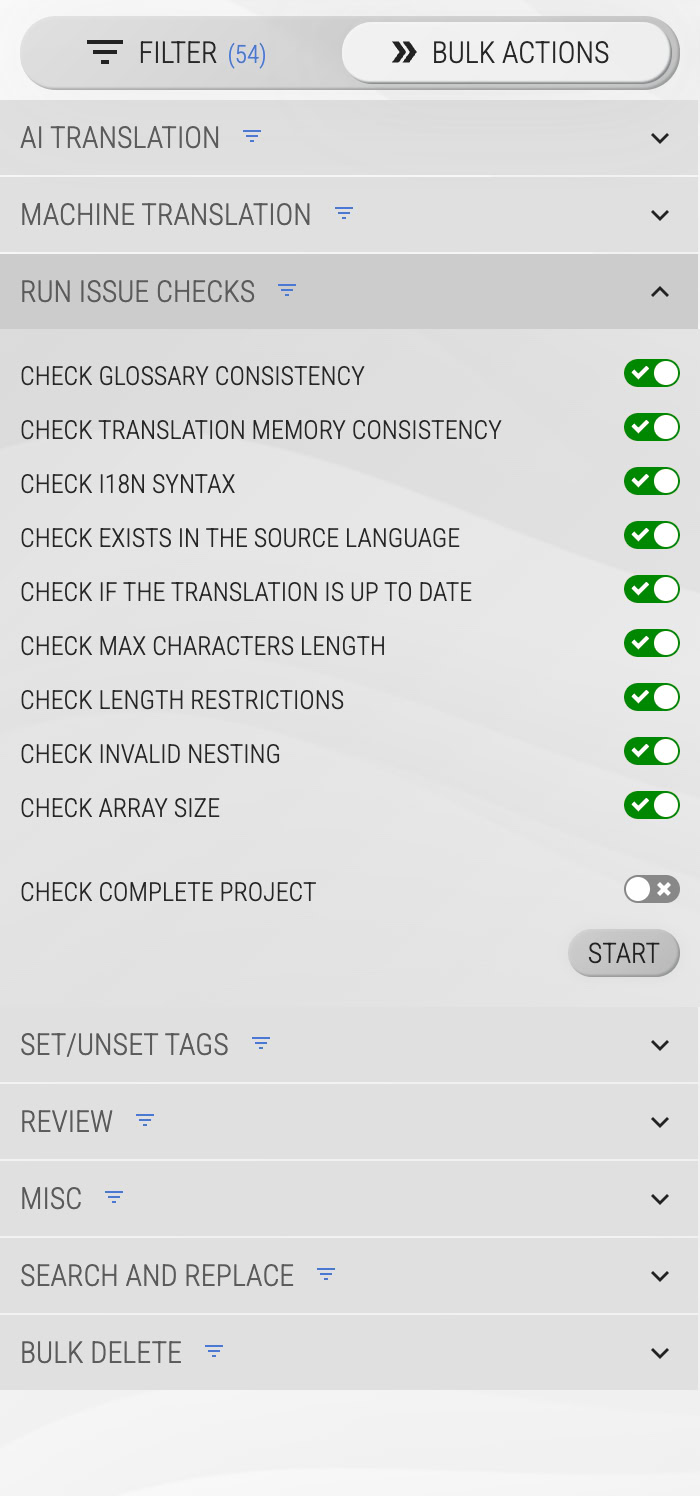
<script>into your application through a translation. - Findings surface inline in the editor on the key, aggregate in the project's translation statistics, and every finding can be ignored per key where the difference is intentional. You can also run all checks across the whole project in one action:
The point of the default is the same as the point of this post: the mechanical layer is not where human attention should go. Let the checks hold that line, give reviewers the glossary, the style guide and the review workflow, and spend the humans on the part machines cannot judge.
If you want to see what the checks find in your own content: create a project, import your existing translation files, and run the checks. The findings are usually not the ones you expected.
Frequently asked questions
What is translation QA? Translation QA (quality assurance) is the practice of checking translated content for defects before it reaches users. It covers the mechanical layer (placeholders, tags, numbers, punctuation, whitespace, consistency) and the judgment layer (meaning, tone, fluency). The mechanical layer can be automated; the judgment layer needs humans, supported by glossaries, style guides and review workflows.
What are the most common errors in translations? Mechanical defects dominate: changed or dropped interpolation placeholders and HTML tags, numbers that differ from the source, missing terminal punctuation, whitespace damage around concatenated values, repeated words, and the same term translated inconsistently across keys.
Can translation QA be automated? The mechanical layer can be checked deterministically on every save, in every language. The judgment layer cannot: machine-translation output can be scored by quality estimation, and human review decides. Working setups combine both.
What is the difference between QA checks and quality estimation (QE)? QA checks are deterministic comparisons against the source and the corpus; they find structural defects and always reproduce. QE is a model-based score predicting the quality of a translation without a reference. QE prioritizes review attention for new machine translations; QA checks guard the whole corpus continuously.
Do automated checks replace human review? No. They remove the mechanical noise so review time goes into meaning, terminology and tone. A reviewer freed from counting brackets is a better linguist, not an unemployed one.
Tired of managing translations by hand?
Locize is the translation management backend by the i18next team: CDN delivery, AI translation, in-context editing, no redeploys.
Start your free 14-day trial