
One command from hardcoded strings to a localized app
AI coding tools changed who ships software. An app built in an afternoon with v0, Lovable, Bolt, or Cursor looks finished, until someone asks for a second language and you realize every string is hardcoded. Internationalizing after the fact used to mean a weekend of wrapping strings, wiring up i18next, creating a project, adding languages, and shipping files around.
It's now one command:
npx i18next-cli localizeThe new localize supercommand in i18next-cli 1.62 chains the whole journey (detect, instrument, extract, connect to Locize, AI-translate, deliver) and ends with a localized, running app.

What one run looks like
$ npx i18next-cli localize
i18next-cli localize — from hardcoded strings to a localized app

[1/6] Detecting project…
      ✔ react + TypeScript
[2/6] Configuration…
      ✔ locales: en, de, fr, it
[3/6] Instrumenting code…
      ✔ 96/101 candidate string(s) instrumented (5 skipped).
[4/6] Extracting translation keys…
      ✔ Translation keys extracted.
[5/6] Connecting to Locize…

  One manual step — in your browser:
    1. Sign up / log in
    2. Create a project. Your target languages (en, de, fr, it) are
       created automatically on the first sync.
    3. Copy your Project ID and an API key.

[6/6] Translating & delivering…
      ✔ Synced to Locize with AI auto-translate requested.
      Waiting for AI translations to arrive…
        de: 96/96 (100%)
        fr: 96/96 (100%)
        it: 96/96 (100%)
      ✔ All languages translated and downloaded.

✅ Done. Your app is localized.

Your AI translations come with confidence scores; low-confidence ones
are flagged for review in Locize.
Step 5 is the single manual moment in the whole flow: sign up at Locize, create a project, paste two credentials. Everything else happens automatically, including creating your target languages. If your config or environment already carries LOCIZE_PROJECTID/LOCIZE_API_KEY, even that step disappears.
What just happened
- Detect: framework (React and Next.js natively), TypeScript, any existing i18next setup.
- Configuration: uses your
i18next.config.ts, or starts the interactiveinitwizard if none exists. - Instrument: wraps hardcoded strings in
t()calls and<Trans>components, injectinguseTranslation()where needed. Interactive by default: you approve each change. This is the instrument command, an assistant, not a compiler. - Extract: collects every key into your locale files.
- Connect Locize: guided signup, and no manual language setup, because the languages from your config are created automatically on the first sync (locize-cli ≥ 12.3, which powers the Locize steps).
- Translate & deliver: syncs with AI auto-translation, which is enabled by default for new projects and uses your glossary and style guide as context. The command then watches the translations arrive, downloads them, and prints the i18next-locize-backend CDN snippet, so future translation fixes go live without redeploying your app.
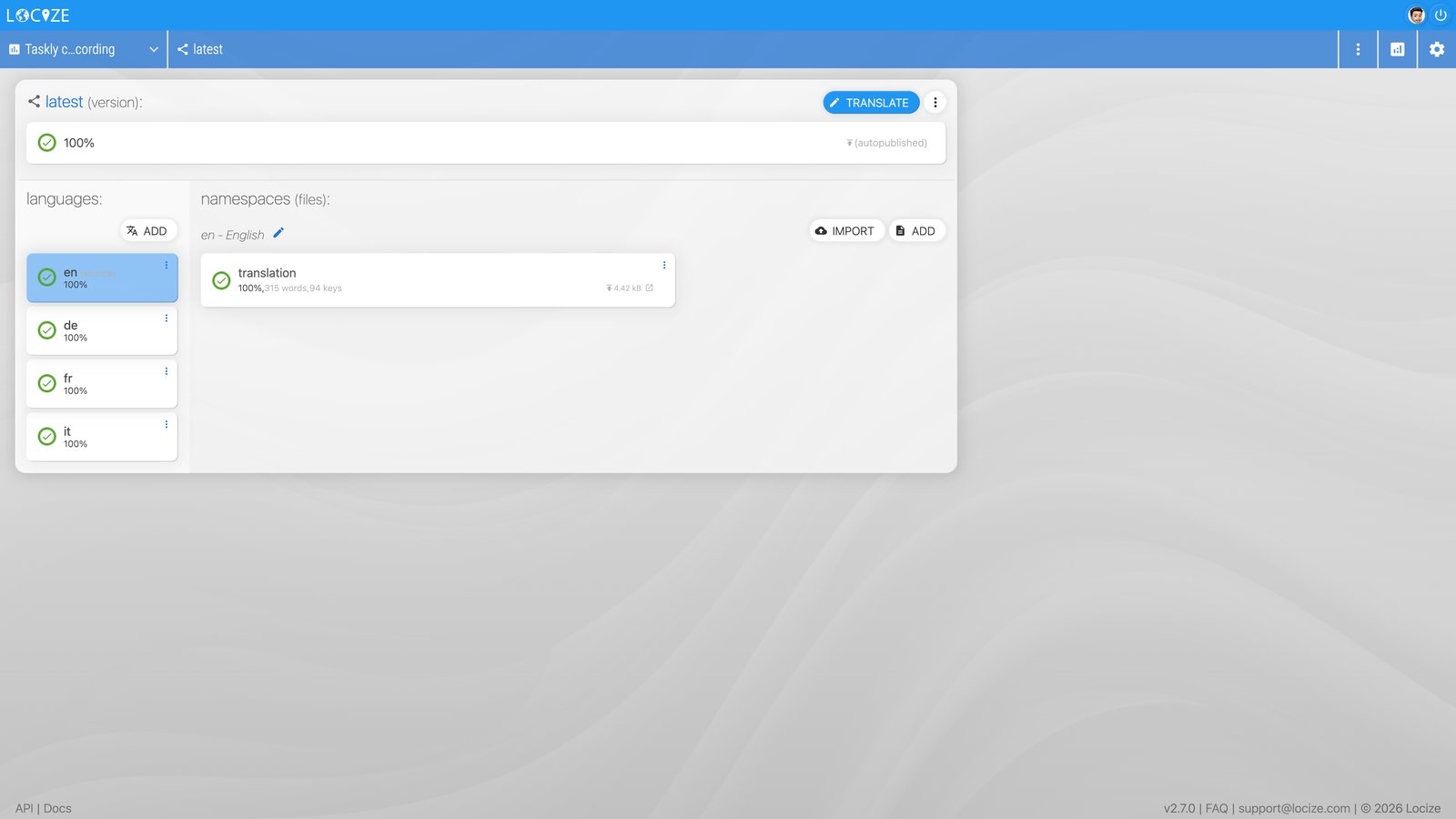
The Locize project after the run: all four languages at 100%, published automatically.
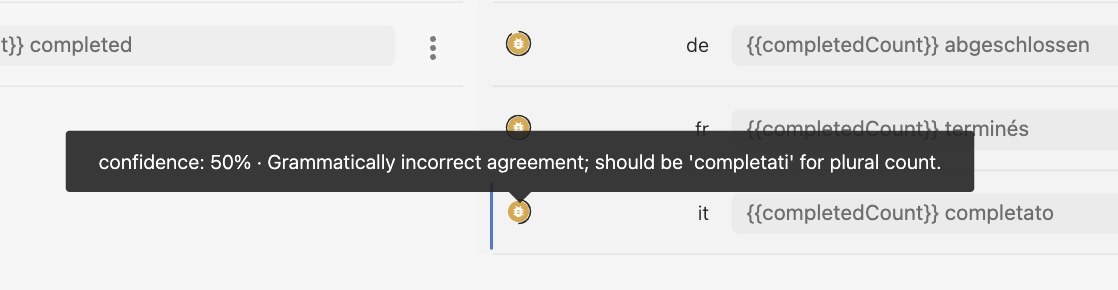
And because Quality Estimation is also on by default for new projects, every AI translation arrives with a confidence score; low-confidence ones are flagged for review instead of shipping silently. Here it caught a real one in this very demo:
Your AI coding agent can run this for you
The apps this command is built for were often written by an agent, so the flow is also available as a prompt:
npx i18next-cli localize --print-agent-promptThis prints step-by-step instructions for Claude Code, Cursor, or any coding agent, using the individual CLI commands (instrument --dry-run, extract, locize-sync, …) instead of the interactive supercommand. The prompt is version-matched to your installed CLI, so it never drifts from what localize itself does. Paste it into your agent, hand over the two Locize credentials when asked, and review the diff at the end.
Honest limits
- Review the instrument diff. Instrumentation is heuristic and interactive for a reason: approve changes per string, and expect to adjust a few (brand names, dynamic labels). A dirty git tree triggers a confirmation prompt first, and
--dry-runpreviews everything without writing. - Next.js App Router:
instrumentinjectsuseTranslation(), which is client-only. Check server components in the diff and either add'use client'or switch them to a server-sidet()pattern. - Non-React stacks degrade gracefully. The transform covers React/JSX out of the box; for Vue or Svelte, add a community plugin (i18next-cli-vue, i18next-cli-plugin-svelte). Without one, the instrument step is skipped with guidance and the rest of the flow (extract → Locize → auto-translate) still runs.
- AI translation runs once the project is subscribed or your own AI/MT provider key is configured. The sync itself works either way, and re-running
localizelater finishes the job: the command is idempotent, so completed steps are simply skipped.
Get started
In your project root:
npx i18next-cli localizeOr preview first with npx i18next-cli localize --dry-run. The full option reference (CI mode, --skip-instrument, namespaces, …) is in the i18next-cli README, and the Locize side is covered in the CLI documentation.
Want this to run on every push instead of locally? The same flow ships as a GitHub Action. See Free CI translation for i18next for the copy-paste workflow, how "free" works, and an honest comparison to the lingo.dev Action and ai-i18n.
If you've been putting off localization because of the plumbing: the plumbing is gone. Create a free Locize account and run the command.
Tired of managing translations by hand?
Locize is the translation management backend by the i18next team: CDN delivery, AI translation, in-context editing, no redeploys.
Start your free 14-day trial