
One product, many customers: per-customer translations with tenants, a worked example
Per-customer translations (also called tenant overrides) let one product speak each customer's language in the literal and the commercial sense: the same app says "patient" for one practice and "client" for another, quotes a 24-hour cancellation policy here and a 48-hour one there, and shows the customer's name instead of yours, while everything else stays one shared set of translations. This post compares the ways teams build that, then walks through a real run: one base project, three customer tenants, their overrides, what happened when the base text changed, and how the app loads the right customer.
- Store the difference, not a copy: a tenant inherits every key and translation of the base and keeps only its overrides. New base keys and base changes reach every tenant that did not override them.
- Overrides do not follow the base: a customer's text stays theirs until it is deleted in the tenant. The editor's "check tenants" shows who overrides a key, with the value.
- One project ID per customer: the app loads the tenant it serves; the CDN files already combine base and overrides, and a tenant's files republish when the base changes (with auto publish; otherwise when you publish the base).
- Only overrides cost words: inherited text is not counted twice. Tenants start with the Growth plan (5 included).
Five ways teams handle per-customer wording
| Approach | How it works | Works well when | Gets hard when |
|---|---|---|---|
| A copy per customer | Duplicate the locale files or the TMS project for each customer | one or two customers, a product that rarely changes | every base change has to be copied into every copy, and copies drift |
| Custom locale codes | A code like de-x-physio holds only the changed keys; i18next falls back to de for the rest | a handful of customers, developers own the files | customers times languages multiply the files; translators see dozens of pseudo-languages |
| A namespace per customer | A physio-north namespace loaded before the shared one | few keys differ | the lookup order lives in each app's i18next config (fallbackNS), and namespaces multiply per customer |
| Interpolation | {{brand}} or {{hours}} inside the strings | only values differ (a brand name, a number of hours) | terminology or tone differ beyond a few variants that i18next context can cover |
| Tenant projects | One project per customer that inherits a base project and stores overrides | many customers, each with its own wording, users and access | overrides have to be checked when the base changes; it needs the Growth plan or higher and packs beyond the included tenants; and for customers whose products really differ, separate projects are simpler |
The first four need no special tooling, and the second one is a perfectly good i18next setup for a few customers. The rest of this post is about the fifth, where one more customer is one more tenant, not one more copy.
The example
ClinicDesk is an appointment app for practices, sold white-label. Its three customers are invented for this example:
| Customer | What it wants different |
|---|---|
| Physio North | "Client" instead of "patient", its own name, its own support line |
| Praxis am See | A 48-hour cancellation period instead of 24 hours, its own name, its own support line |
| Smile Dental | Only its own name |
The base project has 15 keys in English, German and French (French adds one plural form).
Step 1: the base project
The base holds the product's own wording: navigation, buttons, the booking flow, a reminder SMS, the cancellation policy. We reported the 15 English keys with one sentence of context each, and automatic translation filled German and French. For example, the policy became "Sie können bis zu 24 Stunden vor Ihrem Termin kostenfrei stornieren." and "Vous pouvez annuler sans frais jusqu'à 24 heures avant votre rendez-vous."
Step 2: one tenant per customer
On the project's multi-tenant page, each customer gets a tenant: a project of its own, created from the base. With can't deviate from parent switched on (the default), a tenant always has the base's languages and namespaces, so a new language in the base appears in every tenant.
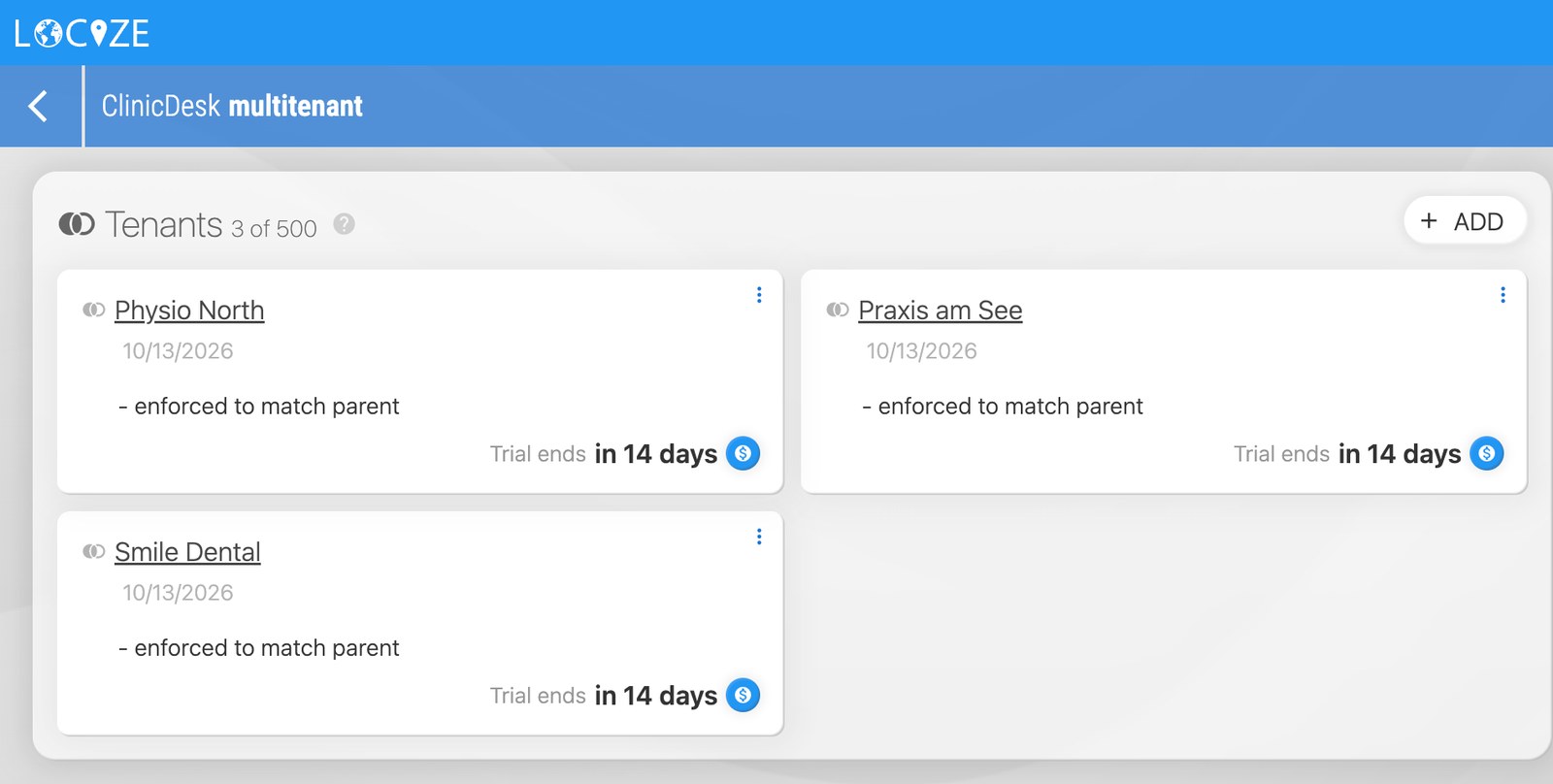
Each tenant has its own project ID, users and API keys. A customer's people can be invited to their tenant alone and do not see the other customers; your own team, as members of your organization, reaches all of them.
Step 3: each customer's own wording
Overrides are ordinary edits inside the tenant: in the editor, over the API or, as here, through the MCP server. We wrote the English overrides for each customer: six for Physio North, three for Praxis am See, one for Smile Dental:
| Key | Base (English) | Physio North | Praxis am See | Smile Dental |
|---|---|---|---|---|
app.title | ClinicDesk | Physio North | Praxis am See | Smile Dental |
nav.patients | Patients | Clients | (base) | (base) |
patients.add | Add patient | Add client | (base) | (base) |
patients.label | Patient | Client | (base) | (base) |
patients.search | Search patients | Search clients | (base) | (base) |
appointments.cancelPolicy | ... up to 24 hours before ... | (base) | ... up to 48 hours before ... | (base) |
footer.support | Questions? Contact the ClinicDesk support team. | Questions? Contact the Physio North front desk. | Questions? Call the practice team. | (base) |
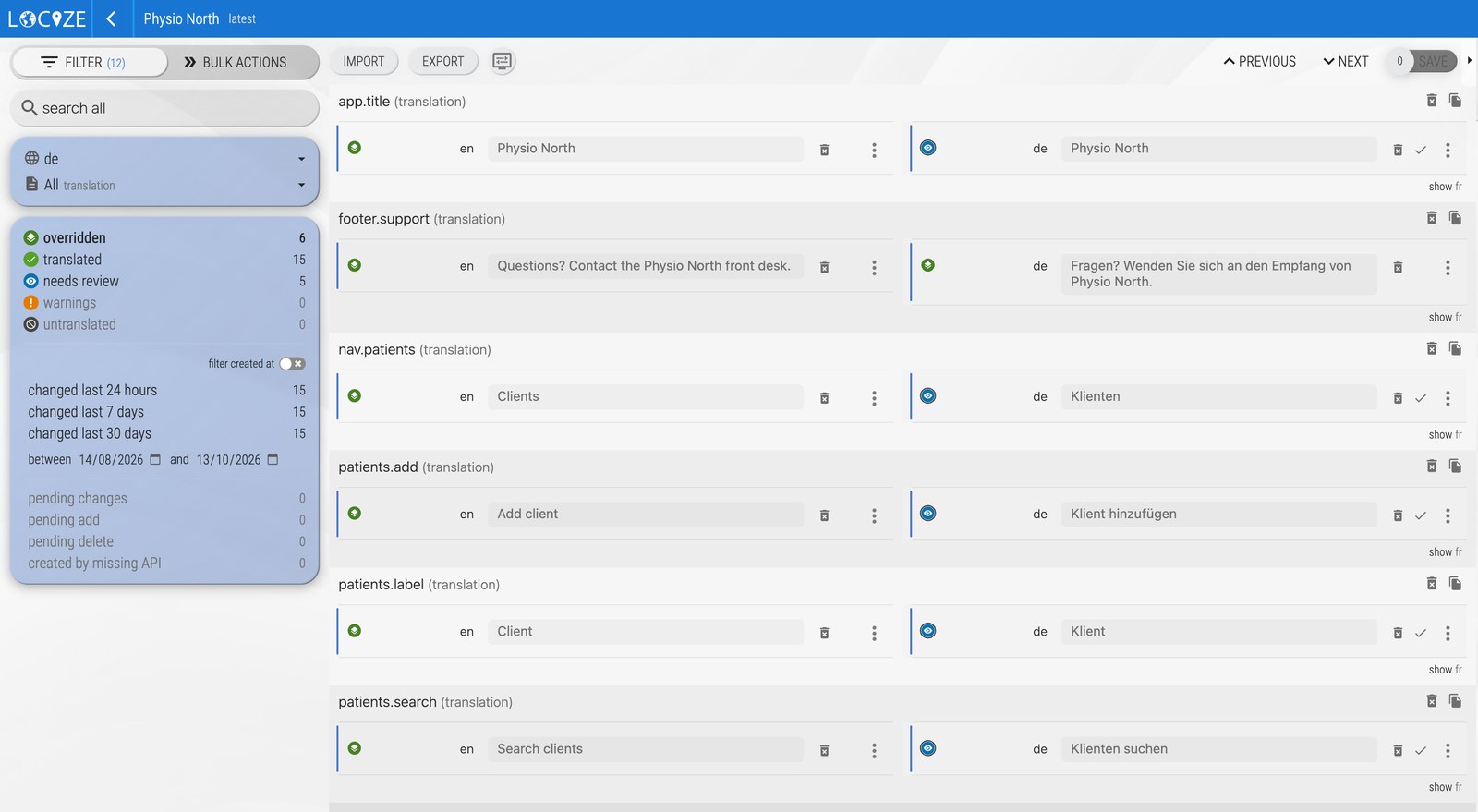
One thing we had not planned for: as soon as Physio North's English overrides were saved, the tenant's automatic translation drafted German and French from them, each with a confidence score and marked for review. We rewrote the support line in both languages and left the other five drafts for the customer's review. Praxis am See's 48-hour policy was drafted the same way ("48 heures" in French); we kept the French draft and replaced the German one. That happens when the tenant has automatic translation on (it takes the setting from the base when it is created) and the override arrives over the API, the CLI or MCP as a key the tenant did not have yet; an override typed in the editor, or a second change to an existing override, is not drafted unless you request a translation.
In the tenant's editor, the overridden filter lists every override, the automatic drafts included:
Step 4: the base changes
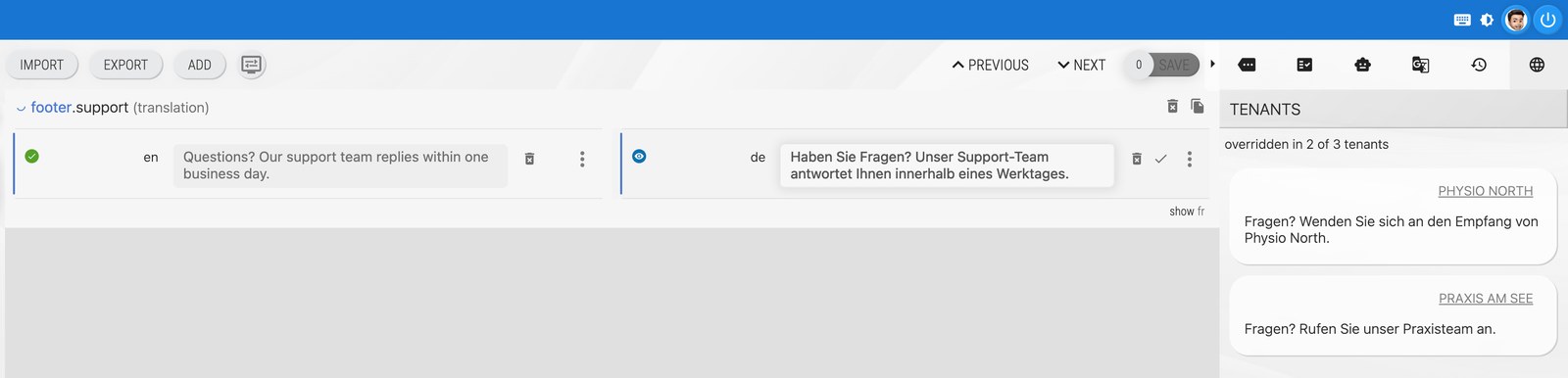
Then we changed one base text: the English support line became "Questions? Our support team replies within one business day.", pushed with automatic translation requested, so German and French were translated again. (Without that request, a changed source text keeps its translations and marks them for review.) Two tenants override that key, one does not:
- Smile Dental (no override) showed the new line right away, in German "Haben Sie Fragen? Unser Support-Team antwortet Ihnen innerhalb eines Werktages.", and its files on the CDN carried it without anyone publishing the tenant (the version publishes automatically; otherwise the tenant republishes when you publish the base).
- Physio North and Praxis am See kept their own lines. A raw read of the tenant (by someone with access to the base) shows next to each override which base value it replaces, so an agent or a script can compare them.
That is the rule worth remembering: keys a customer did not touch follow the base; keys a customer changed stay theirs until the override is deleted, after which the tenant inherits the base again. Overrides that miss a base improvement are the main risk of the pattern: when the base source text changes, a tenant's overridden translations get a needs-review mark (unless the change was re-translated, as in this run), but an override in the source language gets no signal. The base project's editor has a direct answer to "who is affected": select a key and a language, and check tenants lists the tenants you can open that override it, with their values.
Step 5: loading the right customer
Each tenant's published files on the CDN already combine the base with the customer's overrides: Physio North's English file says "Clients" and "Physio North", Smile Dental's says "Patients" and "Smile Dental". The app only has to know which customer it serves, from the subdomain, the login or a configuration value, and pass that tenant's project ID to the backend:
import i18next from 'i18next'
import LocizeBackend from 'i18next-locize-backend'

// one tenant project ID per customer; customers without own wording load the base
const TENANT_PROJECT_IDS = {
  'physio-north': '<physio north tenant project id>',
  'praxis-am-see': '<praxis am see tenant project id>',
  'smile-dental': '<smile dental tenant project id>'
}
const BASE_PROJECT_ID = '<base project id>'

i18next.use(LocizeBackend).init({
  fallbackLng: 'en',
  backend: {
    projectId: TENANT_PROJECT_IDS[customer] ?? BASE_PROJECT_ID,
    version: 'latest'
  }
})
Because the files load at runtime, a customer's change goes live without a release of your app; how fast users see it depends on caching, covered in updating translations without redeploying. If you bundle translations instead, download each tenant's files in your build the same way.
Cost and access
- Plans: tenants are billed with their base project. Growth includes 5, Professional 10, Professional Plus 20, Enterprise 50; more come in packs (pricing).
- Words: only overridden values count, so the 14 English keys Smile Dental inherits are not charged again.
- Per-tenant breakdown: the tenants panel shows admins an estimate of what each tenant's usage is worth at your rates, for passing costs on to customers.
- Access: customers can work in their tenant without seeing each other; your organization's members reach every tenant.
What to watch
- Overrides freeze a key for that customer. When you improve a base text, check the tenants that override it; deleting an override hands the key back to the base.
- Override every language a customer uses. An English override alone leaves the tenant's other languages on the base text, so a customer could read 48 hours in English and 24 in German. Drafts produced from an override are overrides too: they count as words and no longer follow the base.
- Decide who may override what. A customer editing its own tenant can change any key, including legal text. Keep compliance wording in the base and agree with customers which keys they own.
- Languages per customer. With "can't deviate from parent" switched off, a tenant can have languages the base does not have, and languages added to the base are then not added to it automatically. Choose per tenant.
- Different products are not tenants. If two customers' apps share little more than a login screen, separate projects are simpler.
Try it
The multi-tenant documentation covers the settings and options. Every account starts with a 14-day full-feature trial without a credit card, enough to create a base project and two tenants, override a few keys and load each customer's files in your app.
Frequently asked questions
Keep one base set of translations and store only what a customer changes on top of it. In Locize that is a tenant project per customer: it inherits every key and translation of the base project and keeps its own overrides, its own users and its own project ID. The app loads the tenant of the customer it is serving; the files it gets combine the base with that customer's overrides.
The override keeps its value until someone deletes it in the tenant; then the tenant inherits the base value again. Keys the customer did not override follow base changes. When the base source text changes, the tenant's overridden translations get a needs-review mark (unless that change was re-translated), but an override in the source language itself gets no signal, so check overrides when you change a base text: in the Locize editor, "check tenants" lists the tenants you can open that override the selected key, with their values.
Each tenant has its own project ID. The app decides which customer it serves (from the subdomain, the login or a configuration value) and passes that customer's tenant project ID to the i18next backend; customers without their own wording load the base project. The files on the CDN already combine the base with the overrides, so the app does no merging.
Yes, for a few customers: give each customer a custom language code such as de-x-physio that holds only the changed keys, and let i18next fall back to de for everything else. It works well while developers manage the files; it gets heavy when the number of customers times languages grows, because every combination is another file and translators see dozens of pseudo-languages.
Tenants are billed with their base project. The Growth plan includes 5 tenants, Professional 10, Professional Plus 20 and Enterprise 50; more come in packs. Words count only for overridden values, so text a tenant inherits is not charged twice, and the tenants panel shows a cost breakdown per tenant.
Tired of managing translations by hand?
Locize is the translation management backend by the i18next team: CDN delivery, AI translation, in-context editing, no redeploys.
Start your free 14-day trial