
AI translations that respect your i18n format
AI translation is good with words and careless with syntax. It drops a {{firstname}}, gives a Russian plural the two forms of its English source, or writes a brace too few. The sentence may still read well, but your app greets people without their name, says "2 новых сообщений" where Russian needs "2 новых сообщения", or cannot format the message at all.
Since October 21, Locize does two things about it. In MessageFormat and Fluent projects, the AI is told the syntax rules of your format and the plural forms of the target language. And every AI and machine translation, in every i18n format, is checked against its source before it is stored. A translation that would break your app does not reach it.
This post walks through what changed, with the examples we tested and the numbers we measured. Last week's post was about MessageFormat in the i18next libraries; this one is about the translations.
- The check before storing: every AI and machine translation is checked against its source, in every i18n format.
- Format rules in the prompts: the syntax of MessageFormat and Fluent and the plural forms of the target language.
- Issue 243: plural forms that do not fit the language.
- Issue weights and "fix with AI": which issues matter most, and a button that asks the AI for a fix.
- MessageFormat v2 as a project format.
The AI knows your format and your languages
In a MessageFormat or Fluent project, the instructions Locize sends to the AI now carry the syntax rules of the format and the plural forms of the target language. They go to every AI provider Locize translates with, Locize AI and your own OpenAI, Gemini, Mistral or Lara key, in automatic translation and in the editor. In short, the rules say:
- Translate only the text. Keep every argument, variable, function and option exactly as in the source, and never add a variable.
- Give a plural exactly the forms the target language needs, with the numbers each one stands for: for Russian
one(1, 21, 31),few(2, 3, 4),many(0, 5, 6) andother, even when the English source has only two. Keep exact cases like=0. - In MessageFormat, keep
#and the apostrophe quoting, and never translate keywords likepluralorselect. In Fluent, keep the default marker*, term references like-brandand attributes.
Here is what that changes for a Russian plural. The English source:
You have {count, plural, one {# new message} other {# new messages}}A translation that copies the English shape reads well for 1, 5 and 21, and wrong for 2, 3 and 4 ("У вас 2 новых сообщений"):
У вас {count, plural, one {# новое сообщение} other {# новых сообщений}}With the forms Russian needs, it shows "1 новое сообщение", "2 новых сообщения", "5 новых сообщений" and "1,5 нового сообщения":
У вас {count, plural, one {# новое сообщение} few {# новых сообщения} many {# новых сообщений} other {# нового сообщения}}Writing rules is the easy part, so we measured our own prompt rules and fixed them. We had Locize AI translate 8 test plurals into Russian, Polish, Ukrainian and Czech, three times over: 96 results per measurement. With the first version of our Fluent rule, 57% of a batch came back right; with the rule we shipped, 100%. One message at a time, it went from 76% to 99%. The first version told the model to keep select keys unchanged, and in Fluent a plural is a select, so the model often kept the English variants, or nested a second select inside one of them.
Every AI and machine translation is checked before it is stored
Good rules make good results likely. The check makes sure the broken ones stay out. Automatic translation and AI bulk now check each result against its source before they store it, in every i18n format, i18next included:
- it has to parse;
- it has to keep the placeholders and the tags of the source;
- in MessageFormat and Fluent, a plural needs the forms of the target language.
What happens to a result that fails depends on how badly:
- Broken: it does not parse, or a placeholder or tag is missing or added. It is not stored. An AI result first gets one retry with the problem named; if the retry fails too, the next provider takes the key, as if the first one had returned nothing. If no provider gets it right, the key stays untranslated, and you see it as such.
- Only the plural forms are off: it is stored, because a wrong form for some numbers is better than no translation, and it is marked for review, unless Mark machine translations is set to never in the review workflow. Issue 243 (below) shows what is missing.
An example from an i18next project. The source is Hi {{firstname}}, your workspace is ready., and the AI answers Hallo, dein Workspace ist bereit. Until now, that answer was stored, and German users saw a greeting without their name. Now the check reports the missing {{firstname}}, the model gets a second try with exactly that problem in the prompt, and if it drops the placeholder again, the next provider translates the key.
For i18next projects the check rarely says no. We ran it over a sample of AI translations stored in i18next projects before the check existed: 0.16% would have failed it, nearly all because a placeholder or tag went missing or appeared. Those now go to the next provider instead of into your files.
In the editor, the AI assistant and the machine translation button run the same check but leave the decision to you. A line under each result says it was checked, or what is wrong, and you set the result or, in the assistant, discard it:
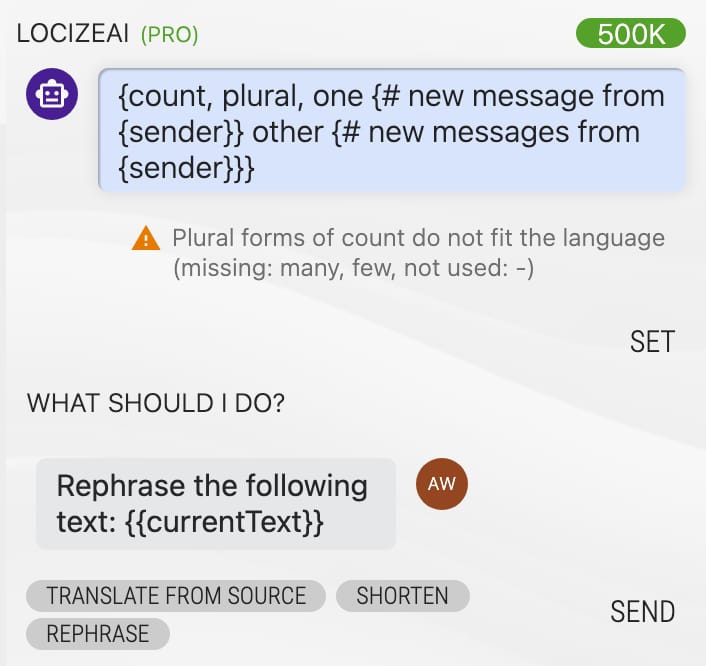
AI bulk does not set a broken result, and tells you how many it left out:
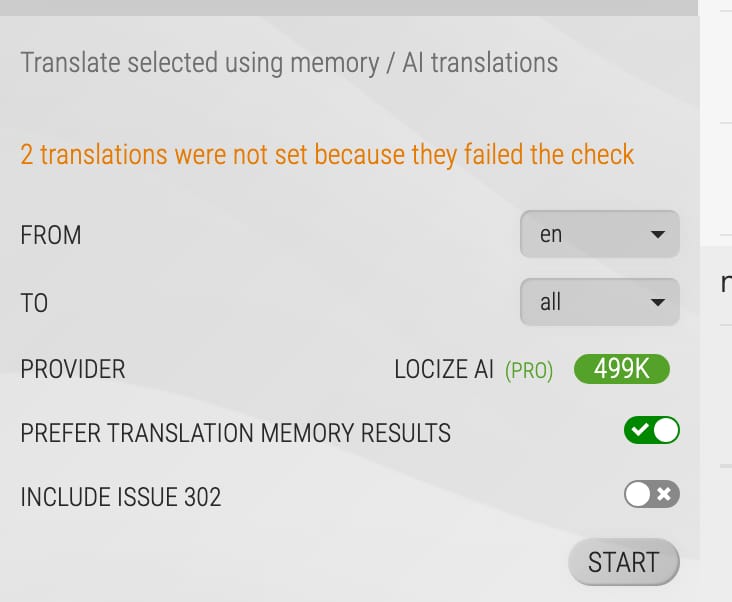
The check is about structure, not language. Whether a translation says the right thing is what quality estimation and AI review judge. And if you translate with an LLM in your own pipeline, our post on when AI translations break explains why plurals and placeholders are among the first things to go wrong there. The details of the check are in the automatic translation docs.
Plural forms that fit the language (issue 243)
The check before storing has a sister that runs on everything already in your project. In MessageFormat (v1 and v2) and Fluent projects, every plural is checked against the plural forms of its language, in every language, the source language too. Issue 243 lists the missing forms with example numbers, like few (2, 3, 4), and the forms the language never uses, like zero in German: Intl never selects it, so 0 shows the other form.
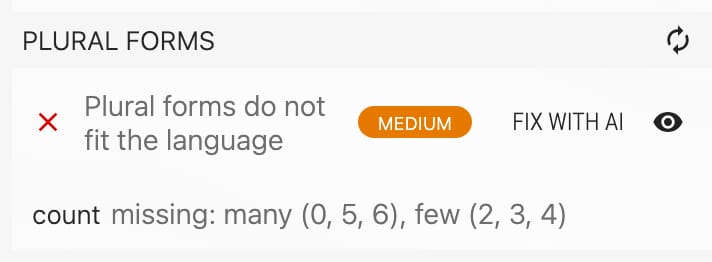
- Some forms a language needs only for exact millions or for decimals, like French
many. They are optional: the issue details show them as untranslated (optional), never as an issue. - Exact cases count. In English
=1coversone; in Russian it does not, because Russianonealso stands for 21 and 31. - The issue is a warning and blocks nothing: you save as before.
In i18next projects, Locize already creates the plural keys each language needs (_few and _many for Russian), so the issue applies to MessageFormat and Fluent. Everything it counts is in the docs of issue 243.
Issue weights and "fix with AI"
Not every issue matters equally to the people using your app. A missing placeholder can break a screen; a doubled space rarely bothers anyone. The Issue settings row of the Translation Quality card in the project settings (formerly "Issues to ignore") now opens one list of all issues. Per issue, you ignore it, give it a weight (high, medium or low) and switch on fix with AI.
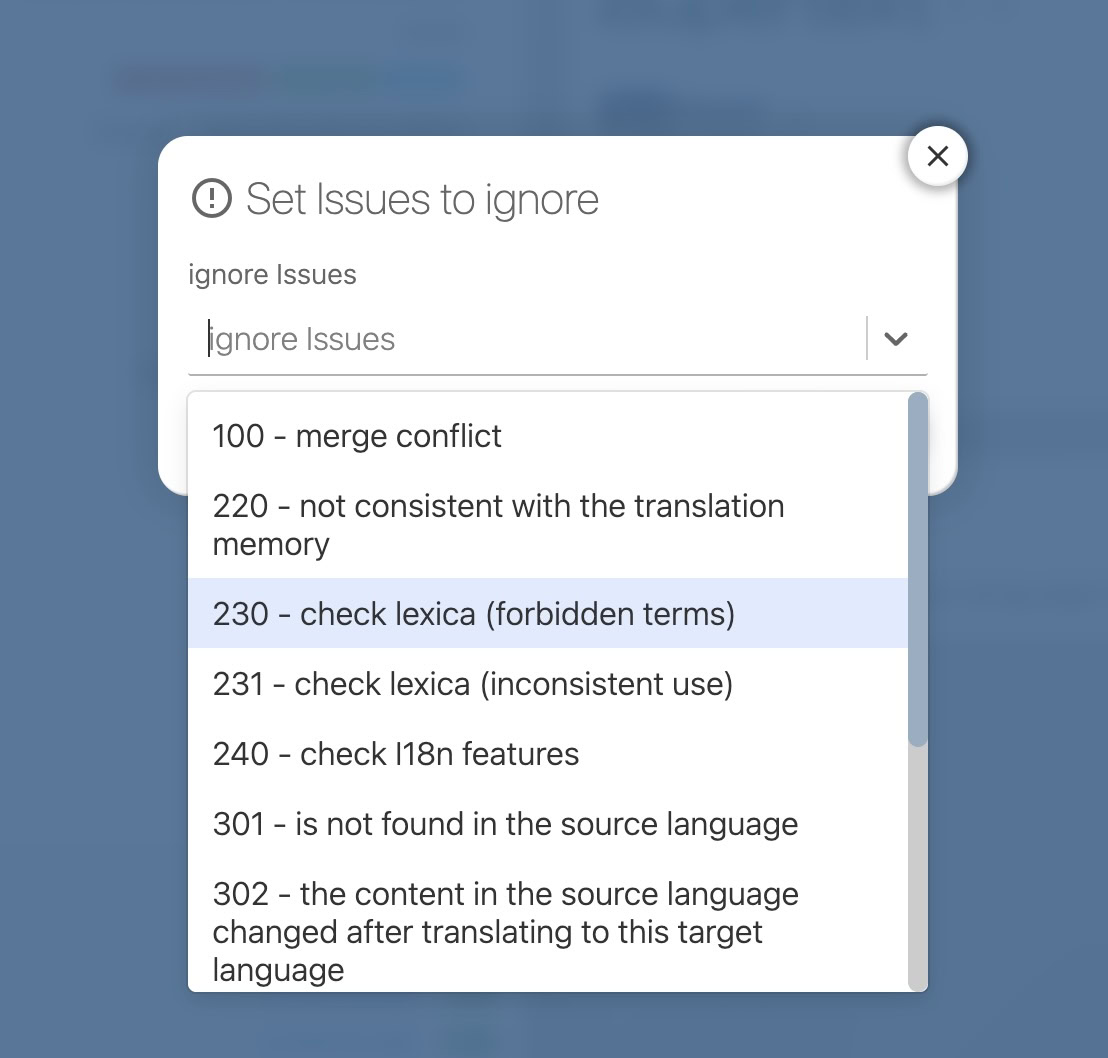
- The editor labels each issue with its weight, and the warnings and errors filter lists the issues high first.
- "Fix with AI" adds a button to the issue. It opens the AI assistant with the issue as the instruction. The answer goes through the same check as every AI translation and is only a proposal: you set it or discard it.
- It is offered only for issues an AI can fix from the source without a judgement: glossary terms, placeholders and arguments, plural forms, length, punctuation, numbers, brackets, URLs and HTML tags.
- Each use costs AI tokens of your plan, or a call to your own AI provider, so it is off until you switch it on.
Here is "fix with AI" on the Russian plural from issue 243. The instruction names the forms Russian needs, and the answer passed the check:
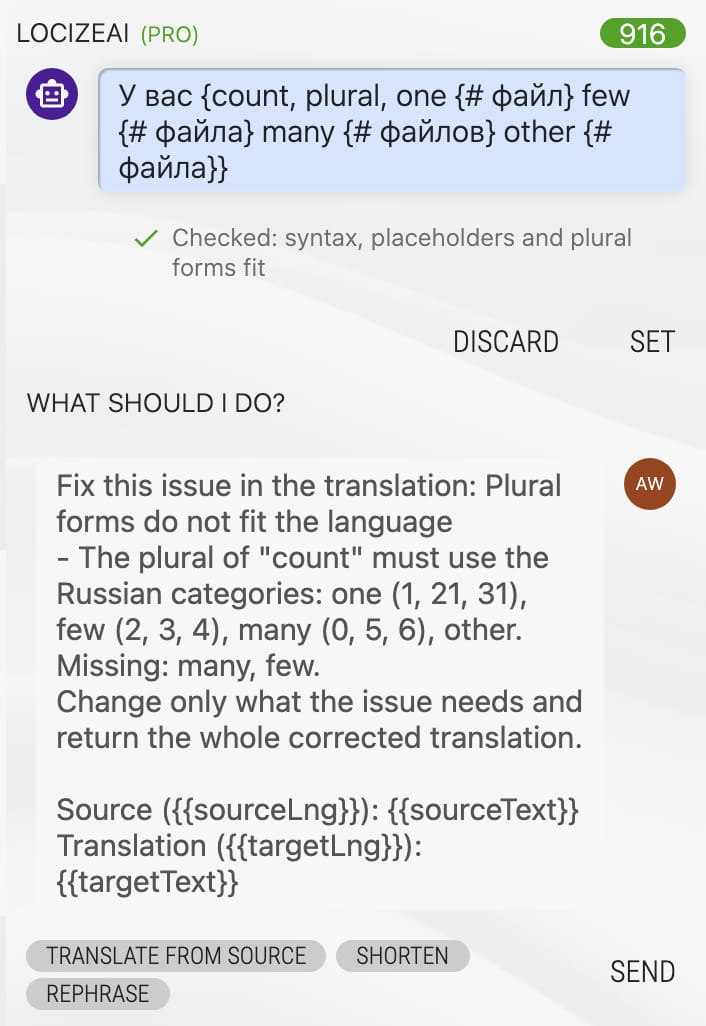
New projects start with default weights. In existing projects, the list shows no weights until you set them, and use the default weights fills them in with one click. Issues your project ignores are now hidden in the editor's issue view too. The default weight of every issue is in the checks docs.
MessageFormat 2 as a project format
Projects can now use MessageFormat v2, the Unicode standard for messages, with syntax highlighting, the same checks and the same AI rules as the format you know as MessageFormat, which is now called MessageFormat v1. That makes Locize one of the first translation management systems to support MessageFormat 2 as a project format.
.input {$count :number}
.match $count
one {{You have {$count} new message}}
* {{You have {$count} new messages}}
The Russian translation gets one, few, many and the catch-all *, and the AI rules cover the two mistakes we saw most often in our tests: other written where MessageFormat 2 needs *, which makes the message invalid, and a space right after {{, which MessageFormat 2 keeps as text, so your app shows it.
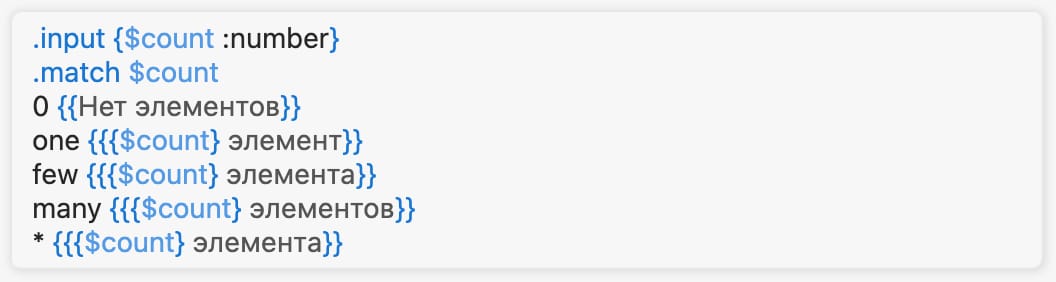
In the editor, a MessageFormat 2 message is one highlighted text, like a MessageFormat v1 message. For i18next, the plugin is i18next-mf2; last week's post shows it with typed arguments and the CLI, and our MessageFormat 2 overview discusses when switching is worth it. The format itself is described in the i18n formats docs.
Getting started
- The check and the format rules need nothing from you: they apply to every project that translates with AI or machine translation.
- Weights: open Issue settings in the Translation Quality card and click use the default weights, or set your own.
- "Fix with AI": switch it on per issue in the same list.
- MessageFormat v2: choose it as the i18n format when you create a project, or later in the project settings.
If you want to see the check on your own messages, create a free project and import your files.
Frequently asked questions
Does Locize check AI translations before it stores them? Yes. Automatic translation and AI bulk check every AI and machine translation against its source before storing it: it has to parse and keep the placeholders and tags, and in MessageFormat and Fluent a plural needs the forms of the target language. A broken AI result gets one retry with the problem named; if it still fails, the next provider takes the key.
What happens when an AI translation drops a placeholder? It is not stored. The model gets one retry with the missing placeholder named, then the next provider translates the key; if none succeeds, the key stays untranslated. In the editor, the AI assistant and the machine translation button show the problem, and you decide.
How does Locize handle Russian or Polish plurals in AI translation? In MessageFormat and Fluent projects, the prompt names the plural forms of the target language with example numbers. A result with forms missing is stored, marked for review, and issue 243 lists what is missing. In i18next projects, Locize creates the plural keys each language needs.
What does "fix with AI" cost, and which issues can it fix? Each use costs AI tokens of your plan, or a call to your own AI provider, so it is off until you switch it on per issue. It is offered for issues an AI can fix from the source without a judgement, such as plural forms, placeholders, glossary terms, length and tags, and its answer is only a proposal.
Does Locize support MessageFormat 2? Yes. MessageFormat v2 is a project format with syntax highlighting, the same checks and the same AI rules as MessageFormat v1. For i18next, use i18next-mf2.
Tired of managing translations by hand?
Locize is the translation management backend by the i18next team: CDN delivery, AI translation, in-context editing, no redeploys.
Start your free 14-day trial