
You don't have to choose: i18next and inlang, together
If you use i18next, the inlang ecosystem has probably been presented to you as a destination: migrate your setup, adopt a new format, switch your workflow. And so most i18next teams never touched tools like the Sherlock VS Code extension, the Fink web editor, or the Paraglide compiler, even when one of them would have been genuinely useful.
That either/or was never necessary. Your translation files are the interface: if inlang tools can read and write i18next JSON faithfully, you can use both ecosystems on the same project. As of this week, they can. Verified, fixed where it was broken, and one command away:
npx i18next-cli init --inlangOne command, no migration
init --inlang (new in i18next-cli 1.63, also offered as a question in the plain init wizard) scaffolds a ready-made inlang project next to your i18next config:
{
  "$schema": "https://inlang.com/schema/project-settings",
  "baseLocale": "en",
  "locales": ["en", "de", "fr", "it"],
  "modules": ["https://cdn.jsdelivr.net/npm/@inlang/plugin-i18next@6.2.1/dist/index.js"],
  "plugin.inlang.i18next": {
    "pathPattern": {
      "common": "./public/locales/{locale}/common.json",
      "app": "./public/locales/{locale}/app.json"
    }
  }
}
Everything is derived from what i18next-cli already knows: baseLocale and locales from your config, the pathPattern from your extract.output layout, including the namespaced form with namespace names discovered from your primary language's existing files. It also adds the Sherlock extension to your .vscode/extensions.json recommendations (merged comment-aware, never clobbering what's there), and it never overwrites an existing project.inlang/settings.json.
The important part is what it does not do: there is no conversion, no export, no second catalog that starts drifting the moment it's created. The i18next JSON in your repository stays the single source of truth.
What that unlocks
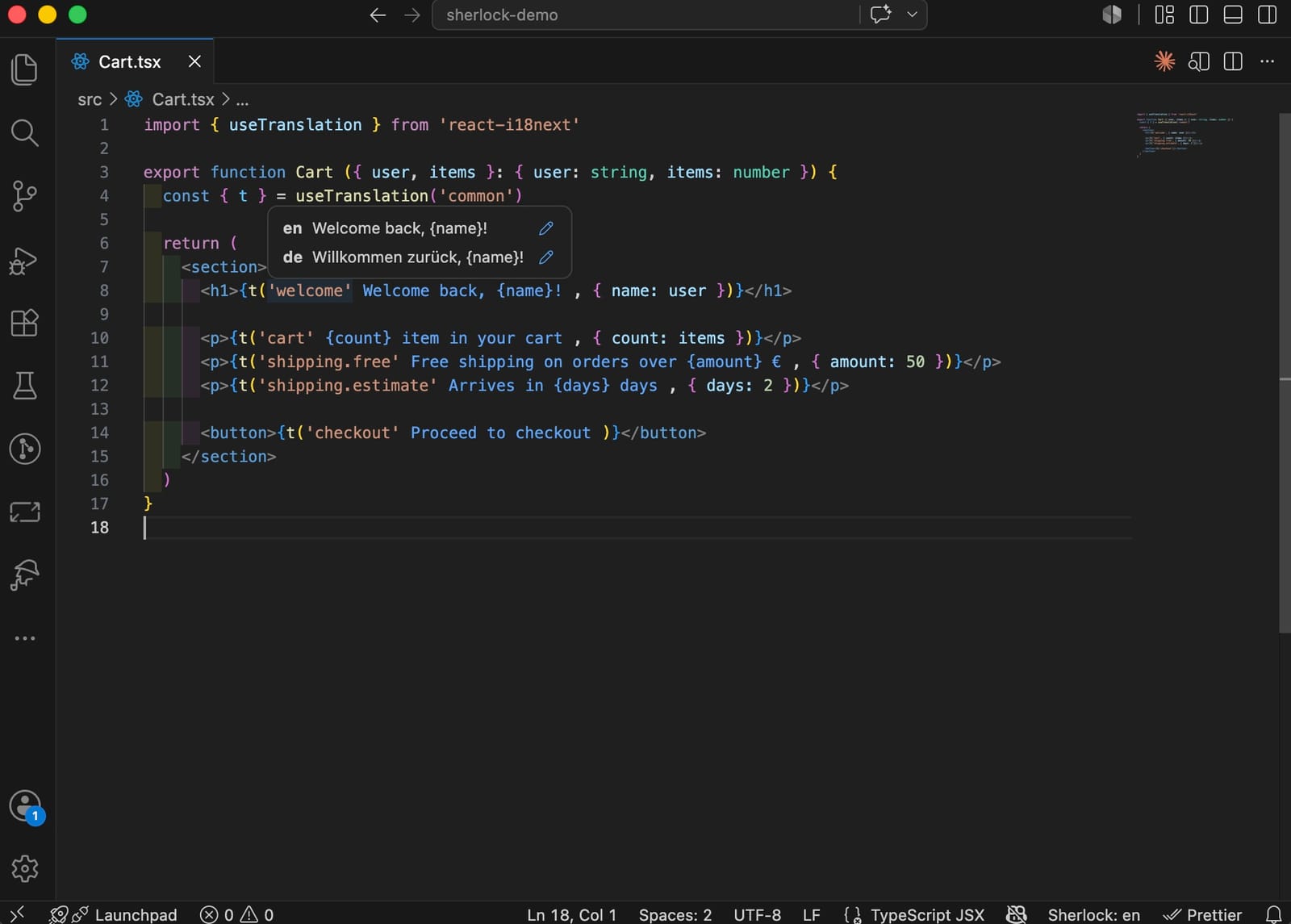
- Sherlock (VS Code): see and edit translations inline where the keys are used, on your real files.
- Fink (browser): hand a translator a link; edits land in the same JSON via git.
- Paraglide (compiler): compile the same files into tree-shakable, fully typed message functions, for example for a new SvelteKit or SolidStart app sitting next to your existing i18next product:
npx @inlang/paraglide-js compile --project ./project.inlangimport * as m from './src/paraglide/messages.js'
m['common:friend']({ count: 1, context: 'male' }) // "A boyfriend"Plurals, context (plain and combined with plurals), _zero, ordinal keys, namespaces, and {{count, number}} formatting all behave the way i18next defines them. See below for why we can say that with a straight face.
Why this works now: six bugs, fixed in a couple of hours
"Interop" claims are cheap, so we tested the whole path end-to-end first: i18next-v4 JSON through the inlang i18next plugin, SDK, and Paraglide compiler, plus the write-back path, because editing tools like Sherlock and Fink must be able to save.
The core held up well, and the rough edges were real. Six bugs across the plugin, SDK, and compiler: context keys silently resolving to the base variant, context projects that couldn't be saved at all, namespaced projects failing on write-back, {{count, number}} formatting silently dropped, _zero never matching at count: 0, and ordinal keys misparsed as a context.
What happened next is the part worth writing about: we filed all six with reproductions, and Samuel Stroschein and the inlang team turned their half around within a couple of hours, reviewed and merged our plugin fixes just as fast, and released everything: @inlang/plugin-i18next 6.2.0, @inlang/sdk 2.10.0, @inlang/paraglide-js 2.19.0. The plugin is first-class maintained on their side. That commitment, plus the speed, is what makes building a bridge on top of it a safe bet. We then re-verified the complete test matrix against the published packages: 15/15 green, with the plugin loaded from the CDN exactly as your project will load it. The inlang team published their own announcement of the integration.
The pattern repeated once more while writing this post: taking the Sherlock screenshot above surfaced a seventh bug (Sherlock silently showed no annotations at all for i18next projects, and had for a long time). Reported with a one-line fix, merged and released as plugin 6.2.1 within hours. The screenshot shows the fixed behavior.
Where Locize fits
The same files that Sherlock and Paraglide now read are the files Locize synchronizes as your hosted TMS:
npx i18next-cli locize-syncThat means the division of labor stays clean. Developers work in the repo, with Sherlock inline or Paraglide-compiled. Translators work where it suits them: Fink for quick git-based edits, Locize for the full workflow with review steps, AI auto-translation with confidence scores, translation memory, glossary, versioning, and CDN delivery so translation fixes go live without redeploying. One set of files, every tool reading and writing it in place.
Honest details
- The plugin version is pinned on purpose. The scaffold writes
@inlang/plugin-i18next@6.2.1, not a floating@6: jsDelivr serves range aliases from edge caches that can lag releases by days and differ between locations. We watched@6serve a two-releases-old plugin after 6.2.0 shipped. A pinned URL means every teammate and CI run gets the same, verified plugin. Bump themodulesURL insettings.jsondeliberately when newer versions ship. - Only
settings.jsonis scaffolded, by design.project.inlang/is inlang's unpacked (git-friendly) project form; inlang tools generate and manage its other files (.gitignore,README.md,cache/) on first use, so expect a few new files there after opening the project with Sherlock or Paraglide. - Namespaces are discovered at scaffold time. If you add a namespace later, add its line to the
pathPatterninsettings.json; a re-run ofinitdeliberately won't touch an existing file. - JSON resource files only. The inlang i18next plugin reads JSON; YAML/JS resource layouts are skipped with a notice.
Get started
In a project with an i18next-cli config (or let the wizard create one):
npx i18next-cli init --inlangOpen the folder in VS Code and install the recommended Sherlock extension, send a translator the Fink link, or point Paraglide's compiler at ./project.inlang. And keep syncing the very same files to Locize for the managed end of the workflow. The full option reference is in the i18next-cli README, and the plugin lives on the inlang marketplace.
Two ecosystems, one set of files. You really don't have to choose.
Tired of managing translations by hand?
Locize is the translation management backend by the i18next team: CDN delivery, AI translation, in-context editing, no redeploys.
Start your free 14-day trial